Graph View draws an RDF file as nodes and edges. Agents write a lot of RDF quickly, and a picture is taken in faster than text, so Graph View is what you look at to see what an agent read and wrote. It draws one node for each named resource, with the values, lists and blocks that resource holds drawn inside it.
One file, two drawings
fleet.ttl describes one solar installation in Turtle: its type, name and capacity, the company that operates it, the capacity of each construction phase as a list, and its point of interconnection as a block. The terms it uses are declared in plants.ttl, a domain model in the same workspace.
Drawn with a node for every resource and for every value the file writes, and an edge for every statement, the file is 16 nodes and 15 edges, three of the nodes blank.
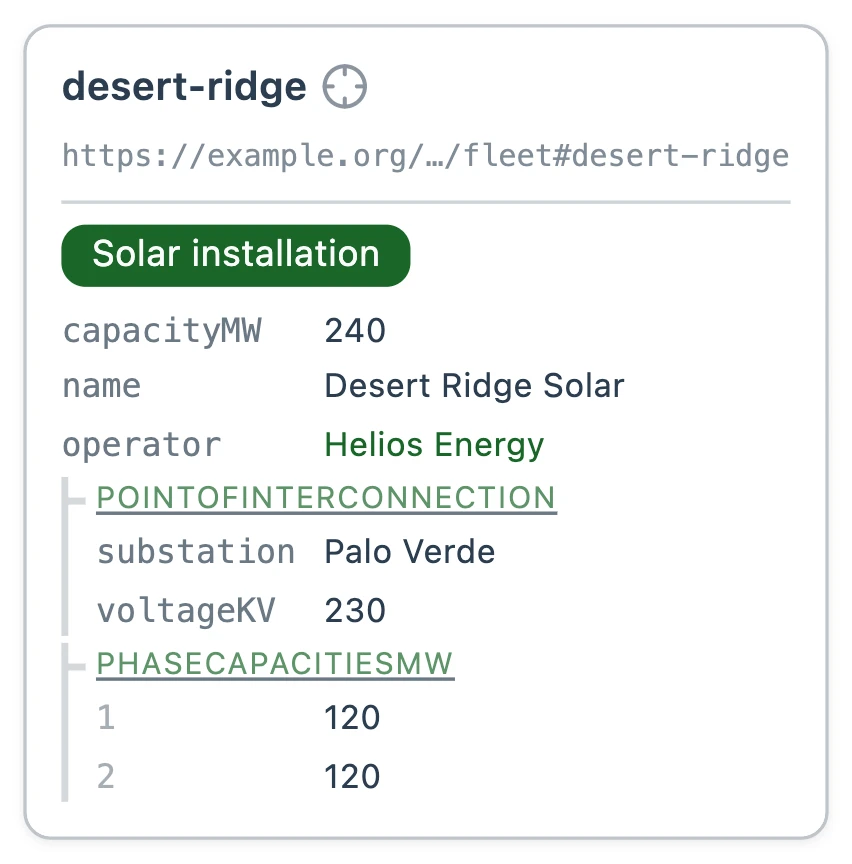
Graph View draws the same file as one node.
@prefix plants: <https://example.org/my-semantic-package/plants#> .
@prefix rdfs: <http://www.w3.org/2000/01/rdf-schema#> .
@prefix : <https://example.org/my-semantic-package/fleet#> .

# Desert Ridge, a 240-megawatt solar installation built in two phases.
# Helios Energy runs it, and it feeds the grid at the Palo Verde substation.
:desert-ridge a plants:SolarInstallation ;
  plants:name "Desert Ridge Solar" ;
  plants:capacityMW 240.0 ;
  plants:operator :helios-energy ;
  plants:phaseCapacitiesMW ( 120.0 120.0 ) ;
  plants:pointOfInterconnection [
    a plants:GridConnection ;
    plants:substation "Palo Verde" ;
    plants:voltageKV 230
  ] .

# Helios Energy, the company that operates Desert Ridge.
:helios-energy a plants:Company ;
  rdfs:label "Helios Energy" .
Inside a node
Graph View draws each of the six parts below inside a node rather than as nodes and edges of its own. It does this for every file.
Types
A type, written a, draws as a badge under the node's name, showing the class's rdfs:label, rather than as an edge to the class.
Values
A literal, such as a name, a number or a date, draws as a row on its subject's node.
Resources with only values
A named resource whose only statements are its types and values draws as a link in the row that refers to it, showing its rdfs:label.
Blocks
A [ … ] block draws as a group inside the node that holds it, headed by the property that holds it.
Lists
A list, written ( … ), draws as a group of numbered rows, one for each item, in order.
Property shapes
In Folio, a class is represented using RDFS and SHACL, and each property shape a class lists draws as a row in its node's Instance properties table, with the value it takes and how many. A node takes the shape its type calls for: desert-ridge, a solar installation, draws its values as rows, and SolarInstallation, with the Class Schema badge, draws its property shapes as this table.
# A SolarInstallation is a photovoltaic power plant connected to the grid.
# It has every PowerPlant property, and adds an optional panel count.
:SolarInstallation a svs:ClassSchema ;
  rdfs:label "Solar installation"@en ;
  rdfs:comment "A photovoltaic power plant connected to the grid."@en ;
  rdfs:subClassOf :PowerPlant ;
  sh:property [
    sh:path :panelCount ;
    sh:name "panel count"@en ;
    sh:description "Number of photovoltaic panels installed."@en ;
    sh:datatype xsd:integer
  ] .
A block inside a block
Graph View draws the inner block as a group inside the outer block's group. Here the point of interconnection holds the interconnection agreement it operates under.
plants:pointOfInterconnection [
  a plants:GridConnection ;
  plants:substation "Palo Verde" ;
  plants:voltageKV 230 ;
  plants:agreement [
    a plants:InterconnectionAgreement ;
    plants:agreementId "IA-2291" ;
    plants:signedOn "2023-02-14"^^xsd:date
  ]
] .
A block more than two levels down keeps its own node, linked from the row that holds it.
Next: Markdown syntax What each Markdown element means to a mapping, and Folio's special syntax.