Folio reads CSV, Apache Parquet and Microsoft Excel files where they are: in your workspace, in a cloud storage bucket on Amazon S3 or Azure Blob Storage, or at a public URL. Each row your mapping names becomes an entity in the graph. Nothing is imported or copied: each query reads the file.
This quickstart starts with one CSV file from the NYC Taxi & Limousine Commission's (TLC) public trip data, then adds a Parquet file to the same domain model. It needs no account. Federation intro covers why your domain model stays in your workspace while the data stays in the source.
1. Add the CSV file
On TLC's trip record data page, under Taxi Zone Maps and Lookup Tables, select Taxi Zone Lookup Table. Save the file as data/taxi_zone_lookup.csv in your workspace.
It has one row per zone, with a number, a borough and a name:
"LocationID","Borough","Zone","service_zone"
1,"EWR","Newark Airport","EWR"
2,"Queens","Jamaica Bay","Boro Zone"
3,"Bronx","Allerton/Pelham Gardens","Boro Zone"
2. Map it into the graph
This file declares Zone as a class in your domain model and binds it to the CSV file with an RML mapping: which file to read, and what each row becomes. In Folio, select New file in the Explorer, then Turtle. Name the file taxi-zones.ttl and paste this into it:
@prefix dct:  <http://purl.org/dc/terms/> .
@prefix rdfs: <http://www.w3.org/2000/01/rdf-schema#> .
@prefix sh:   <http://www.w3.org/ns/shacl#> .
@prefix xsd:  <http://www.w3.org/2001/XMLSchema#> .
@prefix rml:  <http://w3id.org/rml/> .
@prefix svs:  <https://pkg.semvia.io/semvia/core/meta-schema#> .
@prefix svf:  <https://pkg.semvia.io/semvia/rml/functions#> .
@prefix taxi: <https://example.org/taxi#> .

# Folio checks this file as a class schema and as an RML mapping.
<> dct:conformsTo
    <https://pkg.semvia.io/semvia/core/profiles/class-schema> ,
    <https://pkg.semvia.io/semvia/rml/profiles/rml-mapping> .

# A zone is one of the areas TLC divides New York City into.
taxi:Zone a svs:ClassSchema ;
  rdfs:label "Zone" ;
  rdfs:comment """One of the areas, roughly a neighborhood or an airport, that TLC
    divides New York City into and that trip records give instead of an address.""" ;
  sh:property [
    sh:path taxi:name ;
    sh:name "name" ;
    sh:description "The name TLC gives the zone, such as Astoria or JFK Airport." ;
    sh:datatype xsd:string ;
    sh:minCount 1 ;
    sh:maxCount 1
  ], [
    sh:path taxi:borough ;
    sh:name "borough" ;
    sh:description """Which of New York City's five boroughs the zone lies in, or EWR
      for Newark Airport.""" ;
    sh:datatype xsd:string ;
    sh:minCount 1 ;
    sh:maxCount 1
  ] .

# The source: the CSV file, read as a table.
taxi:zones a rml:LogicalSource ;
  rml:source [
    a rml:FilePath ;
    rml:path "data/taxi_zone_lookup.csv"
  ] ;
  rml:referenceFormulation svf:DataFusionSQL .

# Turns each row into a zone entity, addressed by its LocationID.
taxi:ZoneMap a rml:TriplesMap ;
  rml:logicalSource taxi:zones ;
  rml:subjectMap [
    rml:template "https://example.org/taxi/zone/{LocationID}" ;
    rml:class taxi:Zone
  ] ;
  rml:predicateObjectMap [
    rml:predicate taxi:name ;
    rml:objectMap [ rml:reference "Zone" ]
  ], [
    rml:predicate taxi:borough ;
    rml:objectMap [ rml:reference "Borough" ]
  ] .
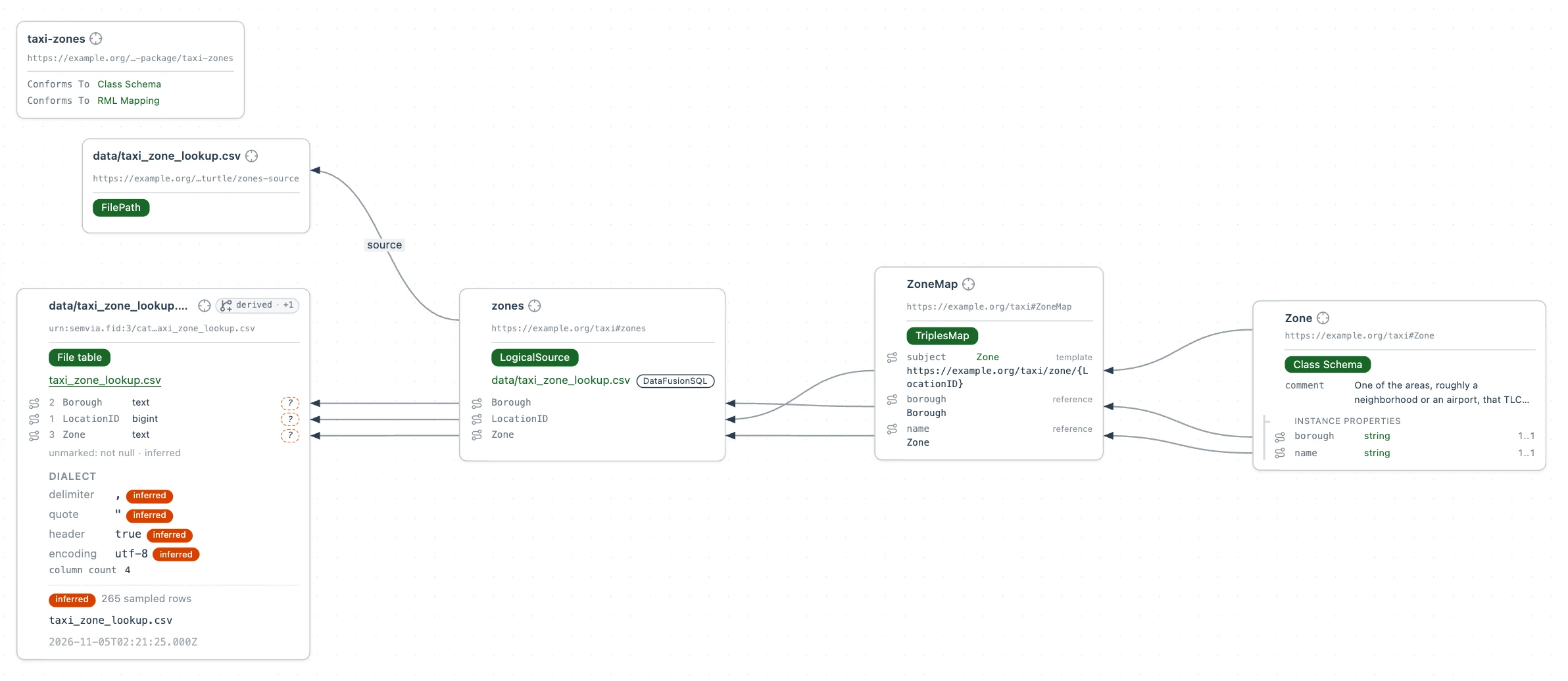
The mapping makes 265 zones, one per row.
3. Ask a question
Query the zones the mapping made, to check that the rows became entities. This query asks for the first ten zones in Queens.
Select New file, then SPARQL Query. Name the file queens.rq, paste this query into it and select Run:
PREFIX taxi: <https://example.org/taxi#>

SELECT ?name WHERE {
  # Each zone in Queens, and its name.
  ?zone a taxi:Zone ;
    taxi:borough "Queens" ;
    taxi:name ?name .
}
# The first ten names, A to Z.
ORDER BY ?name
LIMIT 10
Folio reads the CSV file to answer it.
4. Read the file from its URL
TLC publishes the same file at https://d37ci6vzurychx.cloudfront.net/misc/taxi_zone_lookup.csv, on the server that holds all its trip data. To read it from there instead of from the workspace, add a connection to the server in taxi-zones.ttl, and replace taxi:zones from step 2 with one that roots the file's path on it:
@prefix svdb: <https://pkg.semvia.io/semvia/rml/connection#> .

# The server the file is published on. svdb:endpoint is the URL's scheme and host.
# For a plain HTTPS server, svdb:bucket is any name for its files.
# For a plain HTTPS server, svdb:region is "auto".
taxi:tlc a svdb:BlobConnection ;
  svdb:endpoint "https://d37ci6vzurychx.cloudfront.net" ;
  svdb:bucket "nyc-tlc" ;
  svdb:region "auto" .

# rml:root reads the path from taxi:tlc instead of from the workspace.
# The path is the rest of the URL.
taxi:zones a rml:LogicalSource ;
  rml:source [
    a rml:FilePath ;
    rml:root taxi:tlc ;
    rml:path "misc/taxi_zone_lookup.csv"
  ] ;
  rml:referenceFormulation svf:DataFusionSQL .
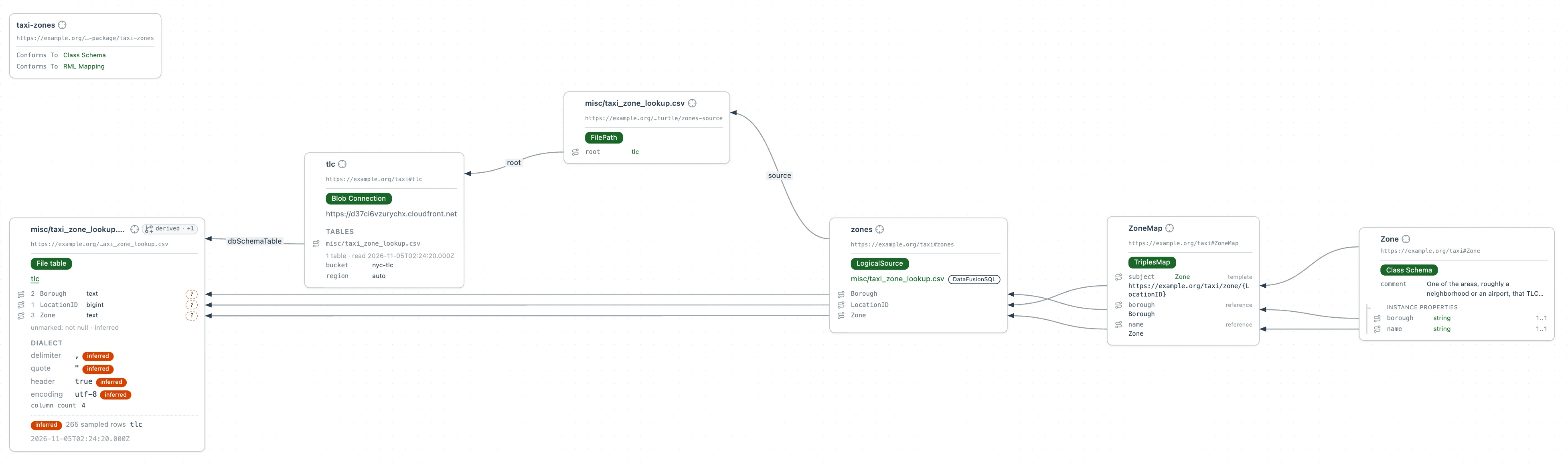
The connection has no security scheme, so Folio reads the file anonymously. Run queens.rq again. The answer is the same, read over HTTPS.
5. Add a Parquet file
TLC publishes its trips as one Parquet file a month. trip-data/green_tripdata_2024-01.parquet on the same server holds January 2024's green taxi trips, one row per trip, with the pickup zone in PULocationID and the total paid in total_amount.
A trip has no identifier of its own, so map a summary instead: a SQL view over the file that counts the trips per pickup zone. Folio runs the view on Apache DataFusion. Each row of the view adds two values to a zone that the CSV already made. Add this to taxi-zones.ttl:
# January 2024's green taxi trips, one Parquet file on the same server.
taxi:trips a rml:LogicalSource ;
  rml:source [
    a rml:FilePath ;
    rml:root taxi:tlc ;
    rml:path "trip-data/green_tripdata_2024-01.parquet"
  ] ;
  rml:referenceFormulation svf:DataFusionSQL .

# The view: a SELECT that reads the Parquet file by its source's name, trips.
# count(*) is an integer. avg() is floating-point, so the view casts it to a decimal.
taxi:pickups a rml:LogicalSource ;
  rml:source taxi:trips ;
  rml:referenceFormulation svf:DataFusionSQL ;
  rml:iterator """
    SELECT "PULocationID" AS zone,
           count(*) AS trips,
           CAST(avg(total_amount) AS DECIMAL(10, 2)) AS average_fare
    FROM trips
    GROUP BY "PULocationID"
  """ .

# Adds the pickups and average fare to the zone the CSV already made.
# It builds the same address for a zone as taxi:ZoneMap.
taxi:PickupMap a rml:TriplesMap ;
  rml:logicalSource taxi:pickups ;
  rml:subjectMap [ rml:template "https://example.org/taxi/zone/{zone}" ] ;
  rml:predicateObjectMap [
    rml:predicate taxi:greenPickups ;
    rml:objectMap [ rml:reference "trips" ]
  ], [
    rml:predicate taxi:averageFare ;
    rml:objectMap [ rml:reference "average_fare" ]
  ] .
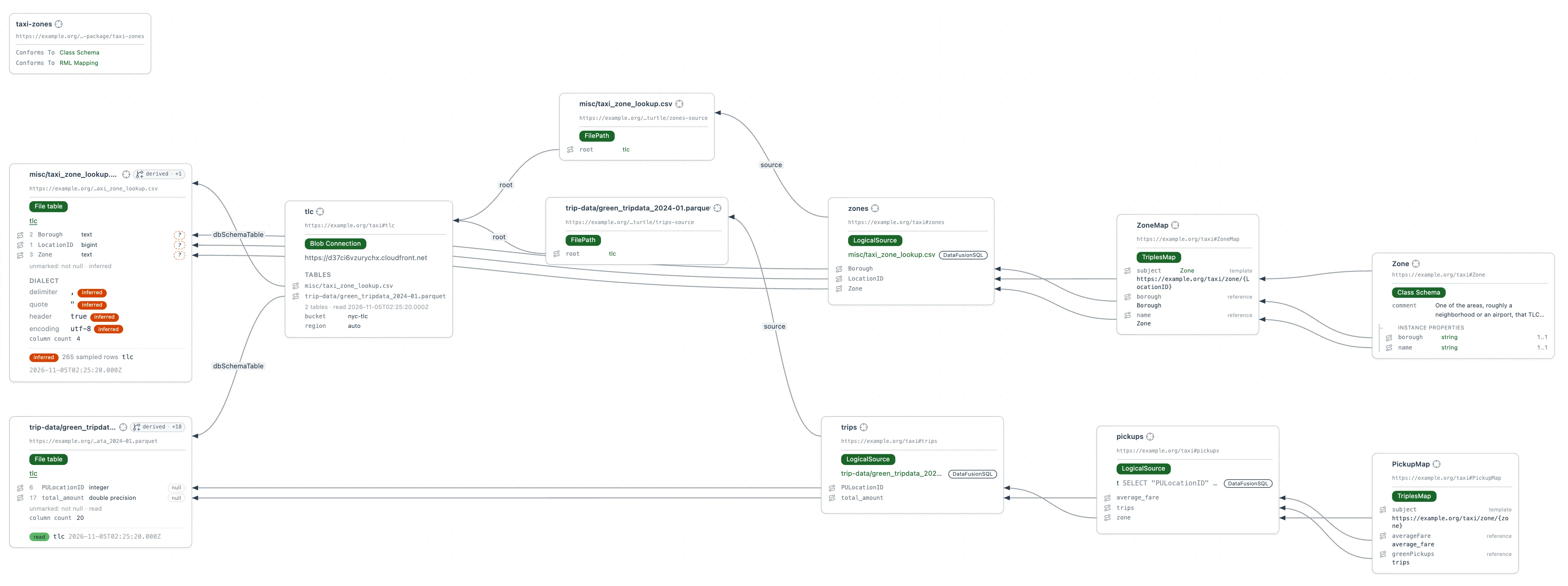
A query sees one zone entity with its name, borough and pickups, though they come from a CSV file and a Parquet file.
Add the two new properties to the Zone class:
# A zone is one of the areas TLC divides New York City into.
# The Zone class, now with the green taxi pickups and average fare from the view.
taxi:Zone a svs:ClassSchema ;
  rdfs:label "Zone" ;
  rdfs:comment """One of the areas, roughly a neighborhood or an airport, that TLC
    divides New York City into and that trip records give instead of an address.""" ;
  sh:property [
    sh:path taxi:name ;
    sh:name "name" ;
    sh:description "The name TLC gives the zone, such as Astoria or JFK Airport." ;
    sh:datatype xsd:string ;
    sh:minCount 1 ;
    sh:maxCount 1
  ], [
    sh:path taxi:borough ;
    sh:name "borough" ;
    sh:description """Which of New York City's five boroughs the zone lies in, or EWR
      for Newark Airport.""" ;
    sh:datatype xsd:string ;
    sh:minCount 1 ;
    sh:maxCount 1
  ], [
    sh:path taxi:greenPickups ;
    sh:name "green pickups" ;
    sh:description "How many green taxi trips started in the zone in January 2024." ;
    sh:datatype xsd:integer ;
    sh:maxCount 1
  ], [
    sh:path taxi:averageFare ;
    sh:name "average fare" ;
    sh:description """The average amount a green taxi trip that started in the zone
      charged its riders in January 2024, in US dollars.""" ;
    sh:datatype xsd:decimal ;
    sh:maxCount 1
  ] .
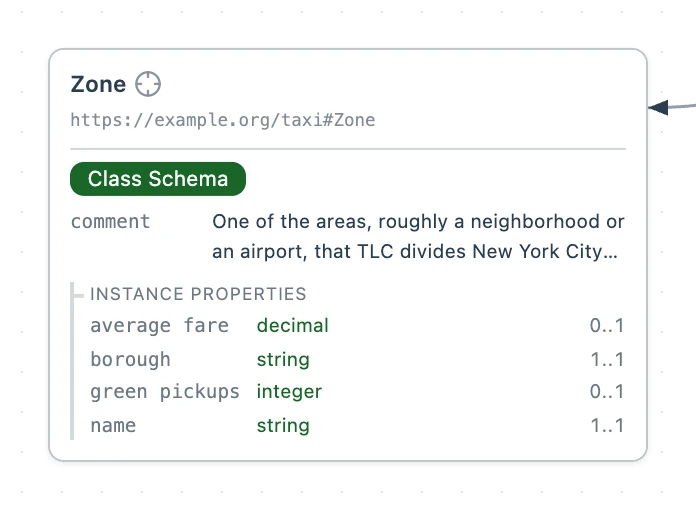
Create top-pickups.rq the same way and paste this query into it. It reads the whole Parquet file, so select Allow full fetch, then Run:
PREFIX taxi: <https://example.org/taxi#>

SELECT ?name ?pickups ?averageFare WHERE {
  # Each zone in Queens with its name from the CSV file,
  # and its green taxi pickups and average fare from the Parquet file.
  ?zone taxi:borough "Queens" ;
    taxi:name ?name ;
    taxi:greenPickups ?pickups ;
    taxi:averageFare ?averageFare .
}
# The five zones with the most pickups.
ORDER BY DESC(?pickups)
LIMIT 5
Each database, API or spreadsheet you add maps onto the same domain model, so one query can span them.
Ask your agent to…
- Find the borough with the most green taxi pickups in January 2024.
- Add February's trips, and compare the two months zone by zone.
- Find the Queens zones that had no green taxi pickups in January 2024.
- List the five zones with the highest average fare among those with more than 100 green taxi pickups.