A power plant operator records its plants in separate systems: an asset register, a maintenance tracker, a spreadsheet of grid connections. A class describes one kind of entity, such as a power plant or a solar installation, whichever system records it. The class lists that entity's properties, which of them are required, and what each may hold. Folio checks every entity against its class as you type.
This quickstart defines a PowerPlant class and a SolarInstallation subclass in one Turtle file, writes an installation in another, and gets the missing name flagged. It takes about five minutes.
1. Pick the Class Schema profile
Select the profile for the type of modeling you want to do.
A profile is the set of vocabularies a file may use, the way imports are in code. How profiles work explains what selecting a profile binds, and Built-in profiles what each choice checks.
- Select New file in the Explorer, pick Turtle, and name the file
plants.ttl. - Open the Profile menu at the top right of the editor. It reads your workspace's name.
- Pick Class Schema. Folio adds a
dct:conformsToline toplants.ttl, and the menu reads Class Schema.
2. Define a class and a subclass
The file below defines two classes. PowerPlant has two properties: a name every plant must have, and an optional capacity in megawatts. rdfs:subClassOf makes SolarInstallation a subclass of PowerPlant, so it inherits PowerPlant's name and capacity under the inherited-properties rule and adds an optional panel count of its own. Write Turtle walks through writing classes like these.
Paste it into plants.ttl, below the dct:conformsTo line.
@prefix : <https://example.org/my-semantic-package/plants#> .
@prefix rdfs: <http://www.w3.org/2000/01/rdf-schema#> .
@prefix sh: <http://www.w3.org/ns/shacl#> .
@prefix svs: <https://pkg.semvia.io/semvia/core/meta-schema#> .
@prefix xsd: <http://www.w3.org/2001/XMLSchema#> .

# A PowerPlant is a facility that generates electricity for the grid.
# Every plant has a name; its capacity is optional.
:PowerPlant a svs:ClassSchema ;
  rdfs:label "Power plant"@en ;
  rdfs:comment "A facility that generates electricity for the grid."@en ;
  sh:property [
    sh:path :name ;
    sh:name "name"@en ;
    sh:description "The plant's registered name."@en ;
    sh:datatype xsd:string ;
    sh:minCount 1
  ], [
    sh:path :capacityMW ;
    sh:name "capacity (MW)"@en ;
    sh:description "Nameplate capacity in megawatts."@en ;
    sh:datatype xsd:decimal
  ] .

# A SolarInstallation is a photovoltaic power plant connected to the grid.
# It has every PowerPlant property, and adds an optional panel count.
:SolarInstallation a svs:ClassSchema ;
  rdfs:label "Solar installation"@en ;
  rdfs:comment "A photovoltaic power plant connected to the grid."@en ;
  rdfs:subClassOf :PowerPlant ;
  sh:property [
    sh:path :panelCount ;
    sh:name "panel count"@en ;
    sh:description "Number of photovoltaic panels installed."@en ;
    sh:datatype xsd:integer
  ] .
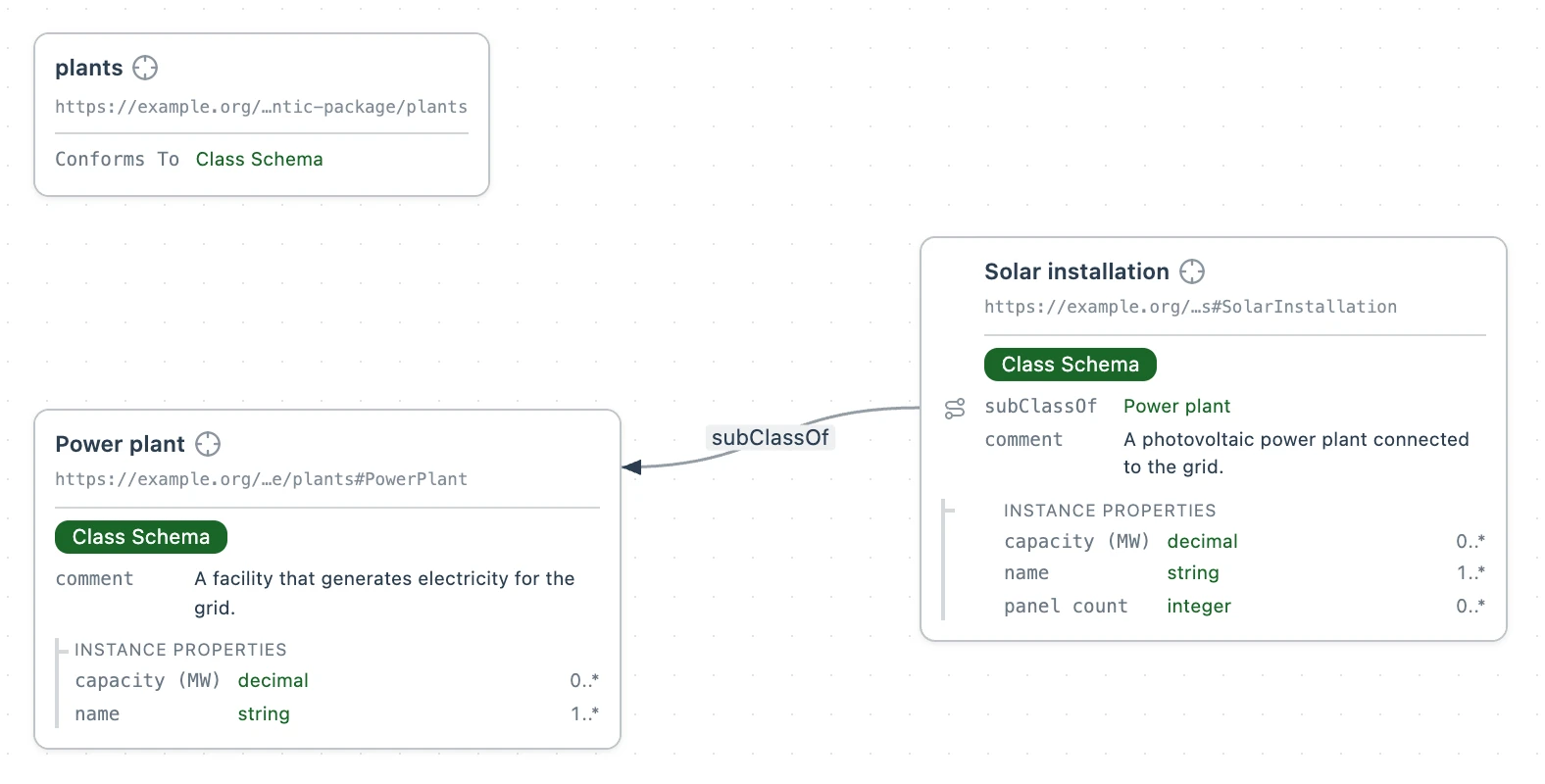
The Class Schema profile asks every property for a name (sh:name) and a description (sh:description). Leave either out and Folio flags the property inline in the editor, with a warning beside it.
3. Add a solar installation without a name
Now test the subclass. Write a solar installation that breaks it by leaving out the required name, and in step 4 Folio flags the missing name.
The installation goes in its own file, fleet.ttl, so your data stays apart from the class that describes it.
No profile needs to be selected for fleet.ttl, since your workspace offers every class its files declare. Where a file gets its profile explains why.
- Select New file in the Explorer, pick Turtle, and name the file
fleet.ttl. - Paste this entity into it. Desert Ridge has a capacity and no name.
@prefix plants: <https://example.org/my-semantic-package/plants#> .
@prefix : <https://example.org/my-semantic-package/fleet#> .

# Desert Ridge, a solar installation of 240 megawatts, with no name yet.
:desert-ridge a plants:SolarInstallation ;
  plants:capacityMW 240.0 .
4. See the missing name flagged
Folio checks Desert Ridge against the SolarInstallation class as soon as you paste it. A red dot sits beside :desert-ridge, which is underlined in red. Hover the underline to read the violation: Desert Ridge must have at least 1 value for name. The Problems view lists it too.
Give Desert Ridge a name to clear it. Add plants:name "Desert Ridge Solar" ; on its own line under :desert-ridge a plants:SolarInstallation ;. The red dot and the underline go. capacityMW and panelCount are optional, so an installation with only a name is fine too.
Ask your agent to…
- Add a NuclearPlant subclass of PowerPlant to plants.ttl with a required reactor count, then write a nuclear plant with no name and no reactor count and show me what's flagged.
- Make capacity at least 0 MW, then add a plant with a negative capacity to fleet.ttl and show me what's flagged.