A taxonomy is a hierarchy of concepts: the departments, sectors or compounds used to organize a domain. This page writes one in SKOS, the W3C standard that libraries, governments and data teams publish their classification systems in, so any tool that reads SKOS can read it too. Folio doesn't require SKOS; it's one vocabulary you can write in, and the SKOS Taxonomy profile checks it for you.
Build a taxonomy
To build a small catalog in a Turtle file:
Click New file at the top of the file tree and pick Turtle. Name the file
product-catalog.ttl. Paste in the sample below.product-catalog.ttl@prefix ex: <https://example.org/my-semantic-package/catalog#> . @prefix skos: <http://www.w3.org/2004/02/skos/core#> . # The Product Catalog: the categories the store sells under. ex:catalog a skos:ConceptScheme ; skos:prefLabel "Product Catalog"@en , "Catalogue de produits"@fr ; skos:definition "The categories our store sells under."@en ; . # Electronics, a top category. ex:electronics a skos:Concept ; skos:inScheme ex:catalog ; skos:topConceptOf ex:catalog ; skos:prefLabel "Electronics"@en , "Électronique"@fr ; skos:definition "Powered devices and gadgets sold in the catalog."@en ; skos:notation "EL" ; . # Computers, under Electronics. ex:computers a skos:Concept ; skos:inScheme ex:catalog ; skos:broader ex:electronics ; skos:prefLabel "Computers"@en , "Ordinateurs"@fr ; skos:definition "Machines for computing: laptops and desktops."@en ; skos:notation "EL-CP" ; . # Laptops, under Computers, also called notebooks. ex:laptop a skos:Concept ; skos:inScheme ex:catalog ; skos:broader ex:computers ; skos:prefLabel "Laptop"@en ; skos:altLabel "Notebook"@en ; . # Desktops, under Computers. ex:desktop a skos:Concept ; skos:inScheme ex:catalog ; skos:broader ex:computers ; skos:prefLabel "Desktop"@en ; . # Phones, under Electronics, also called smartphones. ex:phones a skos:Concept ; skos:inScheme ex:catalog ; skos:broader ex:electronics ; skos:prefLabel "Phones"@en ; skos:altLabel "Smartphones"@en ; . # Apparel, a top category. ex:apparel a skos:Concept ; skos:inScheme ex:catalog ; skos:topConceptOf ex:catalog ; skos:prefLabel "Apparel"@en ; skos:definition "Clothing, footwear, and accessories."@en ; . # Footwear, under Apparel. ex:footwear a skos:Concept ; skos:inScheme ex:catalog ; skos:broader ex:apparel ; skos:prefLabel "Footwear"@en ; . # Sneakers, under Footwear, also called trainers and found by a common misspelling. ex:sneakers a skos:Concept ; skos:inScheme ex:catalog ; skos:broader ex:footwear ; skos:prefLabel "Sneakers"@en ; skos:altLabel "Trainers"@en ; skos:hiddenLabel "Sneekers"@en ; .
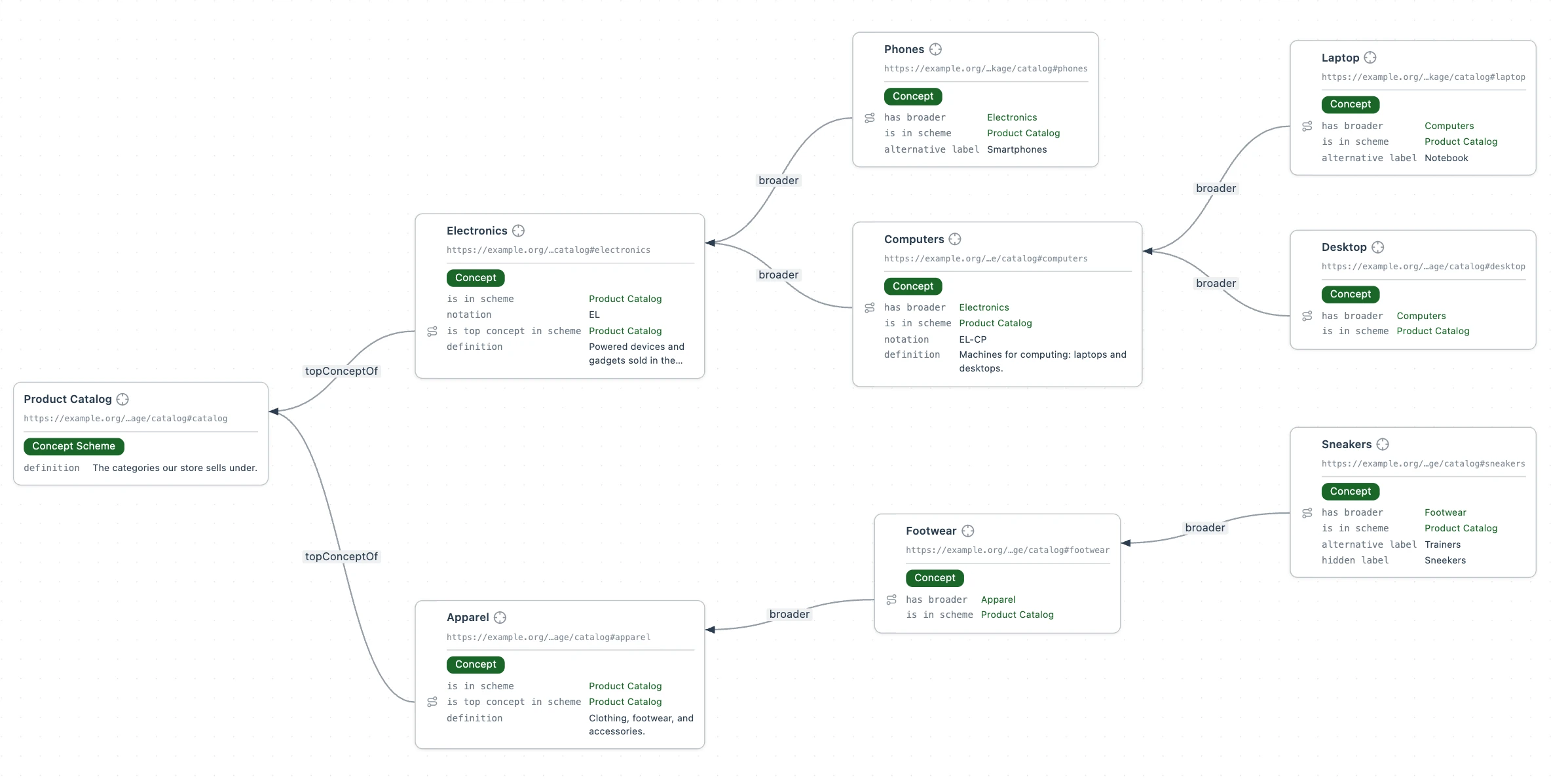
Each concept points broader at its parent, and each root points topConceptOf at Product Catalog. Each concept's card shows only what the file states about it. Next, let's select a profile for the file. A profile is the set of rules Folio checks this file against as you type. The SKOS Taxonomy profile's rules require that every concept has a preferred label, that a
skos:broadervalue is a concept and not text, and that every term is one SKOS declares. The Profile menu sits at the top right of the editor and reads Global until a profile is chosen. Open it and pick SKOS Taxonomy. Folio adds two lines to the file, shown under What the profile checks. For more information, see How profiles work.The Profile menu on product-catalog.ttl. Selecting a profile binds this file. To see whether the file has any issues, click Problems in the activity bar. It should read as No problems to report.
The Turtle you pasted is one of three views of the same file. Beside the Profile menu, the editor's toolbar has a Code and Form switch. Click Form to see each resource as a card, with its fields in the order the profile sets. For the third view, open the Tab actions menu on the file's tab, point at Switch View, and pick Graph View. Each concept and the scheme becomes a card titled by its preferred label, the file gets a card of its own, and each
skos:broaderandskos:topConceptOfline becomes an edge labeled with its predicate.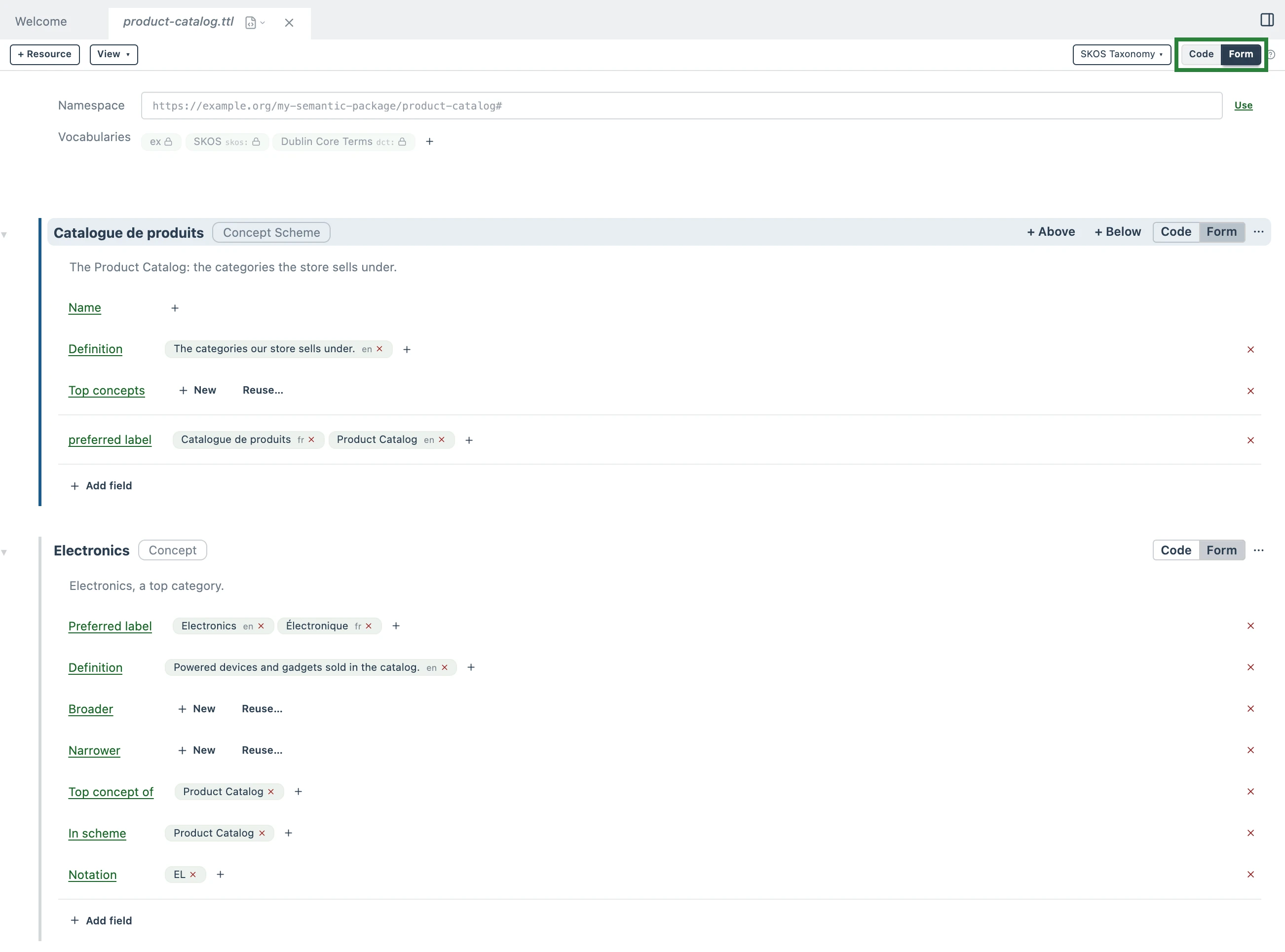
The same file as a form. Each card is one resource. A field with values holds that resource's lines, and an empty field is one the profile offers. The green outline marks the Code and Form switch. 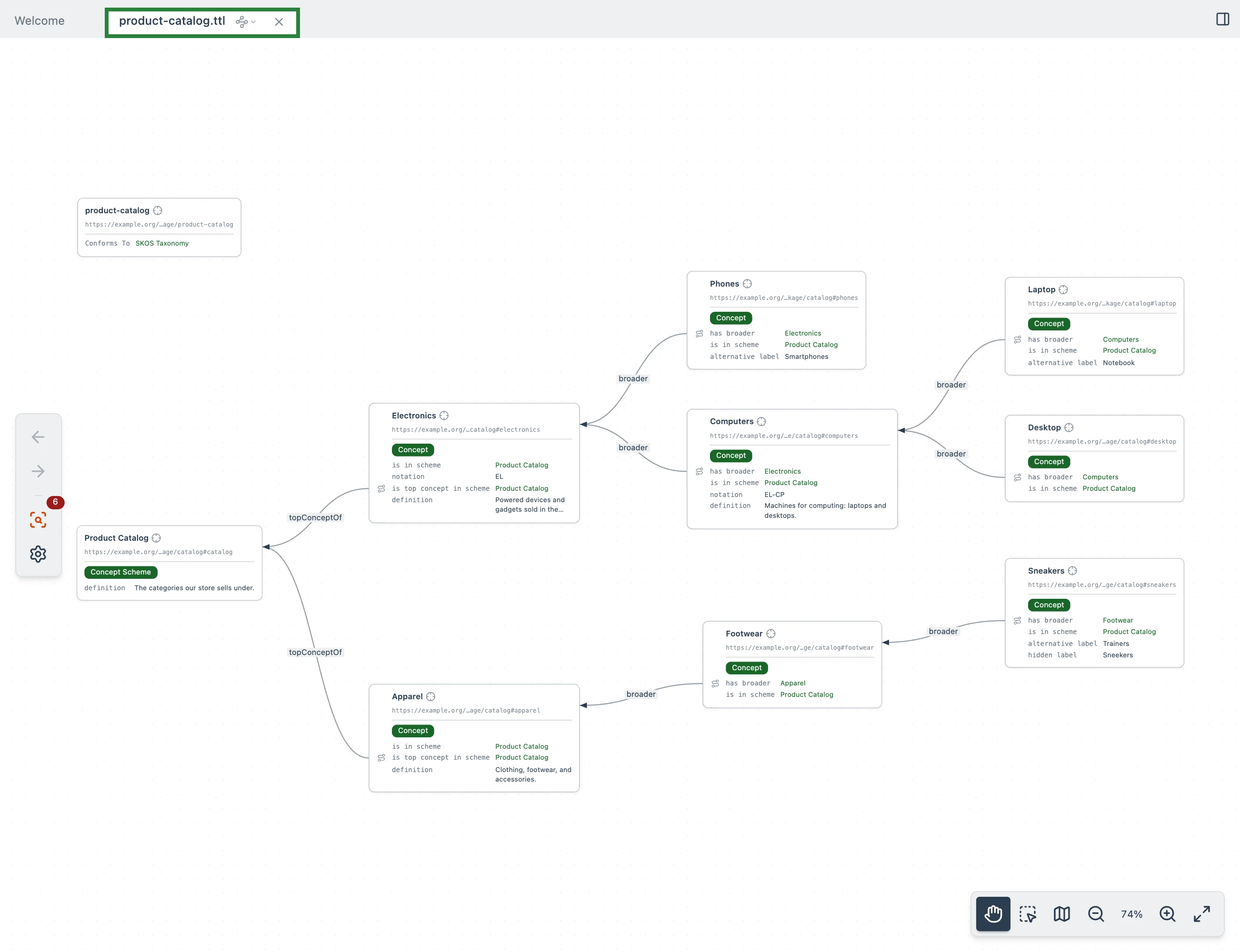
The same file as a graph. Every edge is a line the file writes, so every arrow points from a child to its parent. The green outline marks the file's tab, where the Tab actions menu opens this view. Switch back to the Turtle Editor the same way, through the Tab actions menu. The sections below use whichever view shows a point best.
So far the taxonomy is defined, but nothing has used it yet. Now you can use Folio to query it for information right away, with a SPARQL query. Start with the simplest question: what is every category in our Product Catalog? Click New file, pick SPARQL Query, and name the file
catalog-concepts.rq. Replace the starter query with the one below and click Run.PREFIX ex: <https://example.org/my-semantic-package/catalog#> PREFIX skos: <http://www.w3.org/2004/02/skos/core#> SELECT ?concept WHERE { # every concept in the Product Catalog ?concept skos:inScheme ex:catalog . } ORDER BY ?concept
Every concept in the Product Catalog. Folio shows each one by its preferred label, and each is a link to its block in the file.
The parts of a taxonomy
Every SKOS taxonomy is built from the same few parts: a concept scheme, its concepts, the hierarchy between them, and each concept's labels, definitions and codes. The Product Catalog you just built uses every one of them. The sections below review each part one at a time. Each shows the lines from product-catalog.ttl demonstrating the part and what they mean.
The concept scheme and its concepts
ex:catalog a skos:ConceptScheme ;
  skos:prefLabel "Product Catalog"@en , "Catalogue de produits"@fr ;

ex:electronics a skos:Concept ;
  skos:prefLabel "Electronics"@en , "Électronique"@fr ;
  skos:inScheme ex:catalog ;
A SKOS taxonomy is built from two kinds of building block: a concept scheme and its concepts. The concept scheme is the taxonomy as a whole. In the sample, ex:catalog a skos:ConceptScheme declares the concept scheme, and its preferred labels name it Product Catalog in English and Catalogue de produits in French. How a label is written in more than one language is covered under Labels in other languages. A concept is one term in that taxonomy, so ex:electronics a skos:Concept declares Electronics as a term, and skos:inScheme ex:catalog says which taxonomy it belongs to.
Hierarchy
ex:electronics a skos:Concept ;
  skos:topConceptOf ex:catalog ;

ex:computers a skos:Concept ;
  skos:broader ex:electronics ;

ex:laptop a skos:Concept ;
  skos:broader ex:computers ;
Each child names its parent with skos:broader: ex:laptop skos:broader ex:computers says Laptop is a narrower concept than Computers. The roots name the scheme instead, with skos:topConceptOf ex:catalog.
The file records the Product Catalog hierarchy in one direction only, from each child up to its parent. No line explicitly says which categories are under Electronics. SKOS declares skos:narrower the inverse of skos:broader (and skos:hasTopConcept of skos:topConceptOf), so under the inverse-properties rule Folio concludes each narrower link from the broader line a child wrote, each time a query asks, and never writes it back to product-catalog.ttl. Write each link once, from the child's side.
Ask Folio the question the file never answers in writing: which categories are directly under Electronics? Run this as a SPARQL query:
PREFIX ex: <https://example.org/my-semantic-package/catalog#>
PREFIX skos: <http://www.w3.org/2004/02/skos/core#>

SELECT ?concept WHERE {
  # each concept one step beneath Electronics
  ex:electronics skos:narrower ?concept .
}
Next question: which categories are at the top of the Product Catalog? Run this as a SPARQL query:
PREFIX ex: <https://example.org/my-semantic-package/catalog#>
PREFIX skos: <http://www.w3.org/2004/02/skos/core#>

SELECT ?concept WHERE {
  # each concept at the top of the Product Catalog
  ex:catalog skos:hasTopConcept ?concept .
}
Next question: which categories are under Electronics, at any depth? Run this as a SPARQL query:
PREFIX ex: <https://example.org/my-semantic-package/catalog#>
PREFIX skos: <http://www.w3.org/2004/02/skos/core#>

SELECT ?concept WHERE {
  # each concept under Electronics, however many steps down
  ?concept skos:broader+ ex:electronics .
}
Folio does not conclude skos:broaderTransitive, so the query follows the chain itself.
Definitions
ex:catalog a skos:ConceptScheme ;
  skos:definition "The categories our store sells under."@en ;

ex:electronics a skos:Concept ;
  skos:definition "Powered devices and gadgets sold in the catalog."@en ;

ex:computers a skos:Concept ;
  skos:definition "Machines for computing: laptops and desktops."@en ;

ex:apparel a skos:Concept ;
  skos:definition "Clothing, footwear, and accessories."@en ;
skos:definition spells out what a concept means, so that a person or an agent can tell what belongs under it. The sample defines the scheme, both roots and Computers. The other five have none.
Labels
ex:sneakers a skos:Concept ;
  skos:prefLabel "Sneakers"@en ;
  skos:altLabel "Trainers"@en ;
  skos:hiddenLabel "Sneekers"@en ;
One person's sneakers are another person's trainers. skos:prefLabel is the name a concept shows by. A concept gets one preferred label per language. skos:altLabel adds the other names it goes by, so Trainers finds Sneakers, Notebook finds Laptop and Smartphones finds Phones. Give a concept as many as it needs.
skos:hiddenLabel holds a name that should find the concept but is not one you'd show anyone, usually a common misspelling: Sneekers finds Sneakers. Use it for search, not for display.
Now ask the question a search box would: which concept goes by the name Sneekers? Run this as a SPARQL query:
PREFIX rdfs: <http://www.w3.org/2000/01/rdf-schema#>

SELECT ?concept WHERE {
  # each concept that goes by the name Sneekers, whichever kind of label holds it
  ?concept rdfs:label "Sneekers"@en .
}
SKOS defines its three label properties as sub-properties of rdfs:label, so under the subproperties rule each label is also an rdfs:label and one query searches all three.
Labels in other languages
ex:electronics a skos:Concept ;
  skos:prefLabel "Electronics"@en , "Électronique"@fr ;

ex:computers a skos:Concept ;
  skos:prefLabel "Computers"@en , "Ordinateurs"@fr ;
A language tag after a label says which language it is in: "Electronics"@en , "Électronique"@fr. Electronics and Computers carry a French label beside the English one: Électronique and Ordinateurs. The other six have only English so far.
Codes
ex:electronics a skos:Concept ;
  skos:notation "EL" ;

ex:computers a skos:Concept ;
  skos:notation "EL-CP" ;
skos:notation holds a code that another system already uses for the concept: a SKU prefix, a GL account, an industry code. In the example, Electronics is EL and Computers is EL-CP. A code is not a label: no view shows it as the concept's name, but a query on skos:notation "EL-CP" finds Computers.
What the profile checks
The profile you picked in step 2 of Build a taxonomy binds the file to Folio's SKOS Taxonomy rules. Picking it adds a prefix and one statement about the file itself. You can also type these lines directly into the file:
@prefix dct: <http://purl.org/dc/terms/> .

<> dct:conformsTo <https://pkg.semvia.io/semvia/folio/profiles/skos-taxonomy> ;
.
A file can name more than one profile: tick a second one in the Profile menu and the file is checked against both. How profiles work covers that, and where else a file gets its profile. Folio validates the file against the profile's rules as you type. Among them:
- Every concept has a preferred label.
- No concept has two preferred labels in the same language.
- A
skos:broadervalue is a concept, not text.skos:broader "Apparel"is flagged;skos:broader ex:apparelis not. - Every term is one the profile declares. A misspelled
skos:prefLableis flagged.
Delete Desktop's skos:prefLabel line to see the first. A red dot appears in the gutter, ex:desktop is underlined, and hovering it shows the message. Problems lists the same message under product-catalog.ttl.
Put Desktop's skos:prefLabel line back to remove the error.