Folio reads a database where it is. You name the connection, you map the tables you care about onto entities in your domain model, and each query is answered from the database's current rows. Nothing is copied.
Folio talks to databases through Apache Arrow ADBC drivers, which you install with dbc from Columnar. This quickstart maps two PostgreSQL tables from a small CRM, its accounts and their deals, then joins the open pipeline to each account's parent company from GLEIF, the Global Legal Entity Identifier Foundation. Federation intro covers why your domain model stays in your workspace while the data stays in the source.
Before you start
You need a Postgres database you can reach, and psql.
1. Add the tables
With psql, connect to a database you can write to and run this SQL. It adds an accounts table with 12 accounts, 11 of them carrying the Legal Entity Identifier (LEI) of a real company, and a deals table with their 16 deals:
CREATE TABLE accounts (
  account_id text PRIMARY KEY,
  account_name text NOT NULL,
  lei text CHECK (lei ~ '^[A-Z0-9]{20}$'),
  industry text NOT NULL,
  hq_country text NOT NULL,
  account_owner text NOT NULL,
  created_on date NOT NULL
);

CREATE TABLE deals (
  deal_id text PRIMARY KEY,
  account_id text NOT NULL REFERENCES accounts (account_id),
  deal_name text NOT NULL,
  stage text NOT NULL,
  amount_usd bigint NOT NULL CHECK (amount_usd > 0),
  close_date date NOT NULL
);

INSERT INTO accounts VALUES
  ('ACC-1001', 'Hand Held Products', '549300XSSOVXUBYXG862',
   'Industrial Hardware', 'US', 'D. Okonkwo', '2024-03-11'),
  ('ACC-1002', 'Vocollect', '54930073NMCJIS5FJE52',
   'Warehouse Software', 'US', 'D. Okonkwo', '2024-07-02'),
  ('ACC-1003', 'UOP', '549300IFVOF5LN0ZIL61',
   'Process Technology', 'US', 'R. Halvorsen', '2023-11-28'),
  ('ACC-1004', 'Elster Solutions', '5493000NUZBGRTEZIF52',
   'Metering & Utilities', 'US', 'M. Farrow', '2025-01-16'),
  ('ACC-1005', 'Abiomed', '5493001EZN4ZTB4Z5887',
   'Medical Devices', 'US', 'S. Aliyev', '2024-05-09'),
  ('ACC-1006', 'Acclarent', '549300WMDFIWGQ8X5W71',
   'ENT Devices', 'US', 'S. Aliyev', '2025-02-24'),
  ('ACC-1007', 'Biosense Webster', '549300UJX15XZCKL3C44',
   'Cardiac Mapping', 'US', 'M. Farrow', '2023-09-05'),
  ('ACC-1008', 'LM Wind Power Poland', '5493004VXM8TPZWDMW59',
   'Renewable Energy', 'PL', 'R. Halvorsen', '2024-10-21'),
  ('ACC-1009', 'Global Nuclear Fuel Americas', 'QLMNIEPZSS626JQW4484',
   'Nuclear Fuel', 'US', 'D. Okonkwo', '2025-04-07'),
  ('ACC-1010', 'Snap-on', 'HHWAT5TDOYZMM26KKQ73',
   'Tools & Equipment', 'US', 'M. Farrow', '2023-06-19'),
  ('ACC-1011', 'Grainger', '549300TWZSP6O1IH2V34',
   'MRO Distribution', 'US', 'S. Aliyev', '2024-01-30'),
  ('ACC-1012', 'Nordson', NULL,
   'Dispensing Equipment', 'US', 'R. Halvorsen', '2025-06-12');

INSERT INTO deals VALUES
  ('D-2001', 'ACC-1001', 'Scanner fleet refresh',
   'Negotiation', 420000, '2026-09-30'),
  ('D-2002', 'ACC-1001', 'Barcode SDK renewal',
   'Closed Won', 185000, '2026-06-15'),
  ('D-2003', 'ACC-1002', 'Voice picking rollout',
   'Proposal', 240000, '2026-10-31'),
  ('D-2004', 'ACC-1003', 'Catalyst plant telemetry',
   'Negotiation', 610000, '2026-11-28'),
  ('D-2005', 'ACC-1003', 'Refinery data historian',
   'Discovery', 95000, '2026-12-18'),
  ('D-2006', 'ACC-1004', 'Smart meter data platform',
   'Proposal', 310000, '2026-10-15'),
  ('D-2007', 'ACC-1005', 'Pump registry integration',
   'Negotiation', 275000, '2026-09-15'),
  ('D-2008', 'ACC-1006', 'Surgical inventory pilot',
   'Discovery', 150000, '2027-01-30'),
  ('D-2009', 'ACC-1006', 'Clinical audit extension',
   'Proposal', 90000, '2026-11-13'),
  ('D-2010', 'ACC-1007', 'Catheter trace analytics',
   'Closed Won', 480000, '2026-05-29'),
  ('D-2011', 'ACC-1008', 'Blade QA data capture',
   'Proposal', 130000, '2026-12-04'),
  ('D-2012', 'ACC-1009', 'Fuel assembly traceability',
   'Negotiation', 220000, '2026-10-09'),
  ('D-2013', 'ACC-1010', 'Field tool telemetry',
   'Proposal', 165000, '2026-11-20'),
  ('D-2014', 'ACC-1011', 'MRO catalogue enrichment',
   'Negotiation', 305000, '2026-09-25'),
  ('D-2015', 'ACC-1011', 'Supplier master cleanup',
   'Discovery', 75000, '2027-02-12'),
  ('D-2016', 'ACC-1012', 'Dispensing line analytics',
   'Proposal', 145000, '2026-12-11');
2. Name the connection
In Folio, select New file in the Explorer, then Turtle. Name the file crm.ttl and paste this Turtle into it, naming the database, the driver that reads it and how it signs in:
@prefix dct:    <http://purl.org/dc/terms/> .
@prefix rml:    <http://w3id.org/rml/> .
@prefix td:     <https://www.w3.org/2019/wot/td#> .
@prefix wotsec: <https://www.w3.org/2019/wot/security#> .
@prefix svdb:   <https://pkg.semvia.io/semvia/rml/connection#> .
@prefix crm:    <https://example.org/crm#> .

# Folio checks this file as an RML mapping.
<> dct:conformsTo <https://pkg.semvia.io/semvia/rml/profiles/rml-mapping> .

# The CRM database. svdb:driver names the ADBC driver that reads it.
# svdb:endpoint is its address, written the way Postgres writes it.
# Put in your own server's address.
# Drop sslmode=disable unless the database is on your own machine.
crm:db a svdb:AdbcConnection ;
  svdb:driver "postgresql" ;
  svdb:endpoint "postgresql://localhost:5432/postgres?sslmode=disable" ;
  td:hasSecurityConfiguration crm:dbLogin .

# The database takes a username and a password. You bind them in Folio, never here.
crm:dbLogin a wotsec:BasicSecurityScheme ;
  wotsec:in "auto" .
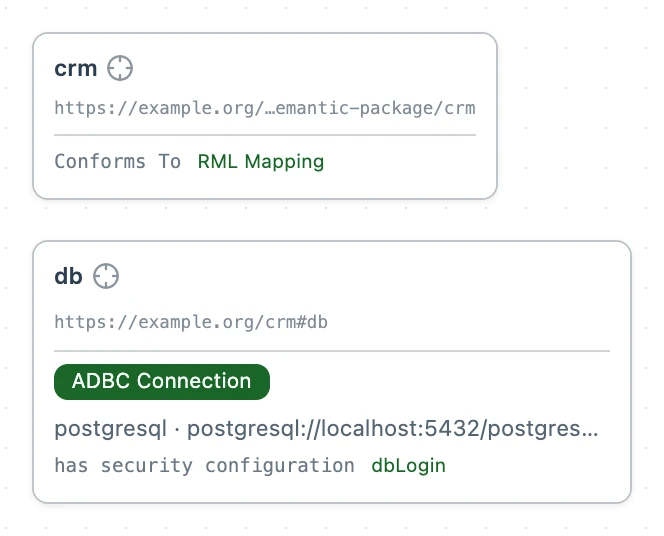
Without sslmode=disable, Folio requires TLS and checks the server's certificate.
3. Install the driver
The first time a workspace names a driver you don't have, Folio says so above the connection, with a link to fix it.
If you don't have dbc yet, install it by following dbc's installation guide.
Select Install postgresql driver, then Install, or run:
dbc install postgresql
Folio says Driver installed.
4. Sign in
Above crm:dbLogin, Folio shows a Bind svwot:username and a Bind svwot:secretValue lens. Folio doesn't connect until both are bound.
- Select Bind svwot:username, enter your Postgres username and select Bind.
- Select Bind svwot:secretValue, enter its password and select Bind.
Keychain, the default store, keeps both on this machine. To check the login, open Secrets in the activity bar, select a field, then Test. Folio says Connection OK. Add credentials covers the other stores.
5. Map the tables
Above crm:db, select View schema. Folio reads the tables from Postgres and lists accounts and deals with their columns.
Add a class for each table, and an RML mapping from each table onto its class, to the end of crm.ttl:
@prefix rdfs:   <http://www.w3.org/2000/01/rdf-schema#> .
@prefix sh:     <http://www.w3.org/ns/shacl#> .
@prefix xsd:    <http://www.w3.org/2001/XMLSchema#> .
@prefix svs:    <https://pkg.semvia.io/semvia/core/meta-schema#> .
@prefix schema: <https://schema.org/> .

# Folio also checks this file as a class schema.
<> dct:conformsTo <https://pkg.semvia.io/semvia/core/profiles/class-schema> .

# An account is a company the sales team sells to.
# It has one name, and links to its legal entity in GLEIF by its LEI.
crm:Account a svs:ClassSchema ;
  rdfs:label "Account" ;
  rdfs:comment "A company the sales team sells to." ;
  sh:property [
    sh:path schema:name ;
    sh:name "name" ;
    sh:description "The name the sales team knows the account by." ;
    sh:datatype xsd:string ;
    sh:minCount 1 ;
    sh:maxCount 1
  ], [
    sh:path crm:legalEntity ;
    sh:name "legal entity" ;
    sh:description "The legal entity the account trades as, named by its LEI." ;
    sh:nodeKind sh:IRI ;
    sh:maxCount 1
  ], [
    sh:path crm:industry ;
    sh:name "industry" ;
    sh:description "The line of business the account is in." ;
    sh:datatype xsd:string ;
    sh:maxCount 1
  ], [
    sh:path schema:addressCountry ;
    sh:name "country" ;
    sh:description "The country of the account's head office, as a code such as US." ;
    sh:datatype xsd:string ;
    sh:maxCount 1
  ], [
    sh:path crm:accountOwner ;
    sh:name "account owner" ;
    sh:description "The salesperson who owns the account." ;
    sh:datatype xsd:string ;
    sh:maxCount 1
  ] .

# A deal is a sale in progress, or won, with one account.
crm:Deal a svs:ClassSchema ;
  rdfs:label "Deal" ;
  rdfs:comment "A sale the sales team is working on, or has won, with one account." ;
  sh:property [
    sh:path schema:name ;
    sh:name "name" ;
    sh:description "What the deal is for." ;
    sh:datatype xsd:string ;
    sh:minCount 1 ;
    sh:maxCount 1
  ], [
    sh:path crm:account ;
    sh:name "account" ;
    sh:description "The account the deal is with." ;
    sh:class crm:Account ;
    sh:minCount 1 ;
    sh:maxCount 1
  ], [
    sh:path crm:stage ;
    sh:name "stage" ;
    sh:description "How far the deal has got, from Discovery to Closed Won." ;
    sh:datatype xsd:string ;
    sh:maxCount 1
  ], [
    sh:path crm:amount ;
    sh:name "amount" ;
    sh:description "What the deal is worth, in US dollars." ;
    sh:datatype xsd:integer ;
    sh:maxCount 1
  ], [
    sh:path crm:closeDate ;
    sh:name "close date" ;
    sh:description "The day the deal closed or is expected to close." ;
    sh:datatype xsd:date ;
    sh:maxCount 1
  ] .

# Reads the accounts table through crm:db.
# Each row becomes one account, addressed by its account_id.
# Its LEI becomes a link to the legal entity GLEIF registers under it.
crm:AccountMap a rml:TriplesMap ;
  rml:logicalSource [
    rml:source crm:db ;
    rml:referenceFormulation rml:SQL2008Table ;
    rml:iterator "accounts"
  ] ;
  rml:subjectMap [
    rml:template "https://example.org/crm/account/{account_id}" ;
    rml:class crm:Account
  ] ;
  rml:predicateObjectMap [
    rml:predicate schema:name ;
    rml:objectMap [ rml:reference "account_name" ]
  ], [
    rml:predicate crm:legalEntity ;
    rml:objectMap [ rml:template "https://example.org/lei/{lei}" ]
  ], [
    rml:predicate crm:industry ;
    rml:objectMap [ rml:reference "industry" ]
  ], [
    rml:predicate schema:addressCountry ;
    rml:objectMap [ rml:reference "hq_country" ]
  ], [
    rml:predicate crm:accountOwner ;
    rml:objectMap [ rml:reference "account_owner" ]
  ] .

# Reads the deals table through crm:db.
# Each row becomes one deal, linked to its account by account_id.
crm:DealMap a rml:TriplesMap ;
  rml:logicalSource [
    rml:source crm:db ;
    rml:referenceFormulation rml:SQL2008Table ;
    rml:iterator "deals"
  ] ;
  rml:subjectMap [
    rml:template "https://example.org/crm/deal/{deal_id}" ;
    rml:class crm:Deal
  ] ;
  rml:predicateObjectMap [
    rml:predicate schema:name ;
    rml:objectMap [ rml:reference "deal_name" ]
  ], [
    rml:predicate crm:account ;
    rml:objectMap [ rml:template "https://example.org/crm/account/{account_id}" ]
  ], [
    rml:predicate crm:stage ;
    rml:objectMap [ rml:reference "stage" ]
  ], [
    rml:predicate crm:amount ;
    rml:objectMap [
      rml:reference "amount_usd" ;
      rml:datatype xsd:integer
    ]
  ], [
    rml:predicate crm:closeDate ;
    rml:objectMap [
      rml:reference "close_date" ;
      rml:datatype xsd:date
    ]
  ] .
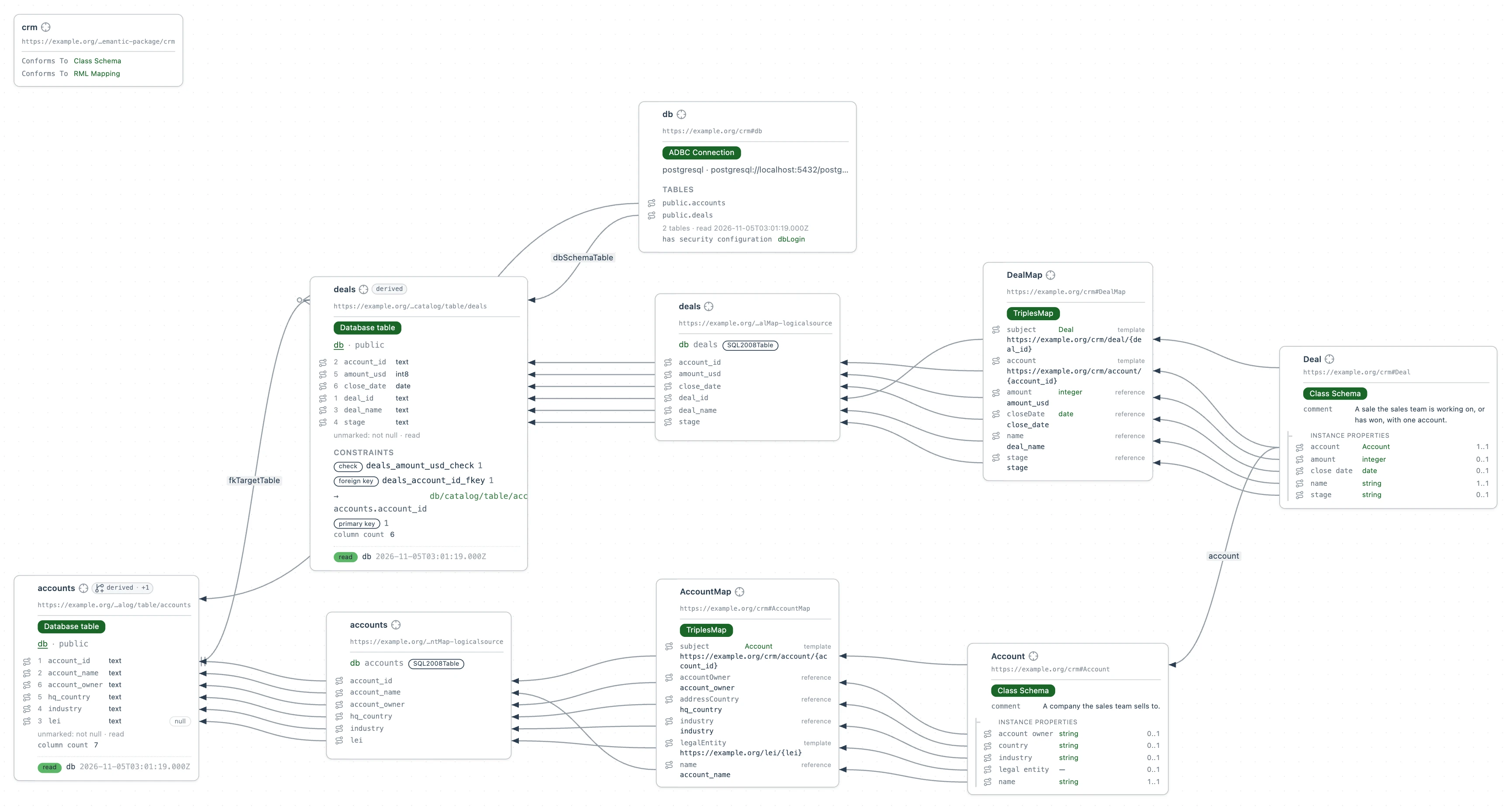
DealMap builds each deal's account with the template AccountMap gives each account, so the two meet on one address. Nordson has no LEI, so it has no legalEntity.
6. Ask the database
With the tables mapped, query them to see how much of the pipeline is open at each stage.
Select New file, then SPARQL Query. Name the file open-pipeline.rq, paste this SPARQL query into it and select Run:
PREFIX crm: <https://example.org/crm#>

SELECT ?stage (COUNT(?deal) AS ?deals) (SUM(?amount) AS ?pipeline) WHERE {
  # Each deal, with its stage and what it is worth.
  ?deal a crm:Deal ;
    crm:stage ?stage ;
    crm:amount ?amount .
  # Only the deals still open.
  FILTER(?stage != "Closed Won")
}
# One row for each stage, the biggest pipeline first.
GROUP BY ?stage
ORDER BY DESC(?pipeline)
Each answer comes from the rows in the database now. Add a deal with psql and run the query again: the new deal is in the answer.
7. Describe the GLEIF API
GLEIF registers each LEI with the legal entity's name and country, and records a company's ultimate parent when the company reports one. This file describes three GLEIF lookups by LEI as a Thing Description, which Folio relies on to know where to send a request and what comes back, and maps each response onto organizations. The LEI records, which GLEIF can filter by LEI, give an organization's LEI, legal name and country. The ultimate parent lookup gives the company that ultimately owns an organization, and the record of one LEI gives that parent's legal name. Select New file, then Turtle. Name the file gleif.ttl and paste this into it:
@prefix dct:        <http://purl.org/dc/terms/> .
@prefix rdfs:       <http://www.w3.org/2000/01/rdf-schema#> .
@prefix sh:         <http://www.w3.org/ns/shacl#> .
@prefix xsd:        <http://www.w3.org/2001/XMLSchema#> .
@prefix td:         <https://www.w3.org/2019/wot/td#> .
@prefix hctl:       <https://www.w3.org/2019/wot/hypermedia#> .
@prefix htv:        <http://www.w3.org/2011/http#> .
@prefix jsonschema: <https://www.w3.org/2019/wot/json-schema#> .
@prefix rml:        <http://w3id.org/rml/> .
@prefix svdb:       <https://pkg.semvia.io/semvia/rml/connection#> .
@prefix svs:        <https://pkg.semvia.io/semvia/core/meta-schema#> .
@prefix schema:     <https://schema.org/> .
@prefix gleif:      <https://example.org/gleif#> .

# Folio checks this file as a Web of Things description, a class schema and an
# RML mapping.
<> dct:conformsTo
    <https://pkg.semvia.io/semvia/core/profiles/web-of-things> ,
    <https://pkg.semvia.io/semvia/core/profiles/class-schema> ,
    <https://pkg.semvia.io/semvia/rml/profiles/rml-mapping> .

# The GLEIF API, and the three properties it offers here.
gleif:api a td:Thing ;
  td:title "GLEIF API" ;
  td:baseURI "https://api.gleif.org/api/v1/" ;
  td:hasPropertyAffordance gleif:leiRecords , gleif:ultimateParent , gleif:leiRecord .

# The LEI records, which GLEIF can filter by LEI: the request to send,
# and the fields of each record in the response that the map below reads.
gleif:leiRecords a td:PropertyAffordance, jsonschema:ObjectSchema ;
  td:name "leiRecords" ;
  td:hasUriTemplateSchema [
    a jsonschema:StringSchema ;
    td:name "filter%5Blei%5D"
  ] ;
  td:hasForm [
    a hctl:Form ;
    hctl:hasTarget "lei-records?page%5Bsize%5D=100{&filter%5Blei%5D}" ;
    htv:methodName "GET" ;
    hctl:forContentType "application/vnd.api+json"
  ] ;
  jsonschema:properties [
    a jsonschema:ArraySchema ;
    jsonschema:propertyName "data" ;
    td:description "The LEI records that match the request." ;
    jsonschema:items [
      a jsonschema:ObjectSchema ;
      jsonschema:properties [
        a jsonschema:ObjectSchema ;
        jsonschema:propertyName "attributes" ;
        td:description "What GLEIF registers for one LEI." ;
        jsonschema:properties [
          a jsonschema:StringSchema ;
          jsonschema:propertyName "lei" ;
          td:description "The 20-character Legal Entity Identifier (ISO 17442)."
        ], [
          a jsonschema:ObjectSchema ;
          jsonschema:propertyName "entity" ;
          td:description "The legal entity the LEI identifies." ;
          jsonschema:properties [
            a jsonschema:ObjectSchema ;
            jsonschema:propertyName "legalName" ;
            td:description "The registered legal name and its language." ;
            jsonschema:properties [
              a jsonschema:StringSchema ;
              jsonschema:propertyName "name" ;
              td:description "The name as recorded in the entity's registration."
            ]
          ], [
            a jsonschema:ObjectSchema ;
            jsonschema:propertyName "legalAddress" ;
            td:description "The address the entity registered in its jurisdiction." ;
            jsonschema:properties [
              a jsonschema:StringSchema ;
              jsonschema:propertyName "country" ;
              td:description "The ISO 3166-1 alpha-2 code of that address's country."
            ]
          ]
        ]
      ]
    ]
  ] .

# The company that ultimately owns the legal entity with a given LEI: the request
# to send, and the fields of the response that the map below reads.
gleif:ultimateParent a td:PropertyAffordance, jsonschema:ObjectSchema ;
  td:name "ultimateParent" ;
  td:hasUriTemplateSchema [
    a jsonschema:StringSchema ;
    td:name "lei"
  ] ;
  td:hasForm [
    a hctl:Form ;
    hctl:hasTarget "lei-records/{lei}/ultimate-parent-relationship" ;
    htv:methodName "GET" ;
    hctl:forContentType "application/vnd.api+json"
  ] ;
  jsonschema:properties [
    a jsonschema:ObjectSchema ;
    jsonschema:propertyName "data" ;
    td:description "The ultimate parent relationship GLEIF records for the LEI." ;
    jsonschema:properties [
      a jsonschema:ObjectSchema ;
      jsonschema:propertyName "attributes" ;
      td:description "What GLEIF records about the relationship." ;
      jsonschema:properties [
        a jsonschema:ObjectSchema ;
        jsonschema:propertyName "relationship" ;
        td:description "The two legal entities the relationship links." ;
        jsonschema:properties [
          a jsonschema:ObjectSchema ;
          jsonschema:propertyName "startNode" ;
          td:description "The legal entity that is owned." ;
          jsonschema:properties [
            a jsonschema:StringSchema ;
            jsonschema:propertyName "id" ;
            td:description "Its Legal Entity Identifier."
          ]
        ], [
          a jsonschema:ObjectSchema ;
          jsonschema:propertyName "endNode" ;
          td:description "The legal entity that ultimately owns it." ;
          jsonschema:properties [
            a jsonschema:StringSchema ;
            jsonschema:propertyName "id" ;
            td:description "Its Legal Entity Identifier."
          ]
        ]
      ]
    ]
  ] .

# The record of the legal entity with a given LEI: the request to send, and the
# fields of the response that the map below reads.
gleif:leiRecord a td:PropertyAffordance, jsonschema:ObjectSchema ;
  td:name "leiRecord" ;
  td:hasUriTemplateSchema [
    a jsonschema:StringSchema ;
    td:name "lei"
  ] ;
  td:hasForm [
    a hctl:Form ;
    hctl:hasTarget "lei-records/{lei}" ;
    htv:methodName "GET" ;
    hctl:forContentType "application/vnd.api+json"
  ] ;
  jsonschema:properties [
    a jsonschema:ObjectSchema ;
    jsonschema:propertyName "data" ;
    td:description "The LEI record." ;
    jsonschema:properties [
      a jsonschema:ObjectSchema ;
      jsonschema:propertyName "attributes" ;
      td:description "What GLEIF registers for the LEI." ;
      jsonschema:properties [
        a jsonschema:StringSchema ;
        jsonschema:propertyName "lei" ;
        td:description "The 20-character Legal Entity Identifier (ISO 17442)."
      ], [
        a jsonschema:ObjectSchema ;
        jsonschema:propertyName "entity" ;
        td:description "The legal entity the LEI identifies." ;
        jsonschema:properties [
          a jsonschema:ObjectSchema ;
          jsonschema:propertyName "legalName" ;
          td:description "The registered legal name and its language." ;
          jsonschema:properties [
            a jsonschema:StringSchema ;
            jsonschema:propertyName "name" ;
            td:description "The name as recorded in the entity's registration."
          ]
        ]
      ]
    ]
  ] .

# Each record in the response. A query that names an LEI asks GLEIF for that
# record only.
gleif:records a rml:LogicalSource ;
  rml:source gleif:leiRecords ;
  rml:referenceFormulation rml:JSONPath ;
  rml:iterator "$.data[*]" ;
  svdb:fillsVariable [
    a svdb:VariableFill ;
    svdb:variableName "filter%5Blei%5D" ;
    svdb:selectsReference "attributes.lei"
  ] .

# Turns each record into an organization entity.
gleif:OrganizationMap a rml:TriplesMap ;
  rml:logicalSource gleif:records ;
  rml:subjectMap [
    rml:template "https://example.org/lei/{attributes.lei}" ;
    rml:class schema:Organization
  ] ;
  rml:predicateObjectMap [
    rml:predicate schema:leiCode ;
    rml:objectMap [ rml:reference "attributes.lei" ]
  ], [
    rml:predicate schema:legalName ;
    rml:objectMap [ rml:reference "attributes.entity.legalName.name" ]
  ], [
    rml:predicate schema:addressCountry ;
    rml:objectMap [ rml:reference "attributes.entity.legalAddress.country" ]
  ] .

# The parent relationship GLEIF records for one LEI.
gleif:parentLinks a rml:LogicalSource ;
  rml:source gleif:ultimateParent ;
  rml:referenceFormulation rml:JSONPath ;
  rml:iterator "$.data" ;
  svdb:fillsVariable [
    a svdb:VariableFill ;
    svdb:variableName "lei" ;
    svdb:selectsReference "attributes.relationship.startNode.id"
  ] .

# Links each legal entity to the company that ultimately owns it.
gleif:UltimateParentMap a rml:TriplesMap ;
  rml:logicalSource gleif:parentLinks ;
  rml:subjectMap [
    rml:template "https://example.org/lei/{attributes.relationship.startNode.id}" ;
    rml:class schema:Organization
  ] ;
  rml:predicateObjectMap [
    rml:predicate schema:parentOrganization ;
    rml:objectMap [
      rml:template "https://example.org/lei/{attributes.relationship.endNode.id}"
    ]
  ] .

# The record GLEIF holds for one LEI.
gleif:entityRecord a rml:LogicalSource ;
  rml:source gleif:leiRecord ;
  rml:referenceFormulation rml:JSONPath ;
  rml:iterator "$.data" ;
  svdb:fillsVariable [
    a svdb:VariableFill ;
    svdb:variableName "lei" ;
    svdb:selectsReference "attributes.lei"
  ] .

# Turns the record into an organization with its LEI and legal name.
gleif:LegalEntityMap a rml:TriplesMap ;
  rml:logicalSource gleif:entityRecord ;
  rml:subjectMap [
    rml:template "https://example.org/lei/{attributes.lei}" ;
    rml:class schema:Organization
  ] ;
  rml:predicateObjectMap [
    rml:predicate schema:leiCode ;
    rml:objectMap [ rml:reference "attributes.lei" ]
  ], [
    rml:predicate schema:legalName ;
    rml:objectMap [ rml:reference "attributes.entity.legalName.name" ]
  ] .

# An organization is a legal entity, such as a company or a fund, that GLEIF
# registers under a Legal Entity Identifier.
schema:Organization a svs:ClassSchema ;
  rdfs:label "Organization" ;
  rdfs:comment """A legal entity, such as a company, fund or government body, that
    is registered under a Legal Entity Identifier.""" ;
  sh:property [
    sh:path schema:leiCode ;
    sh:name "LEI" ;
    sh:description """The 20-character Legal Entity Identifier (ISO 17442) that
      identifies the organization in financial transactions.""" ;
    sh:datatype xsd:string ;
    sh:minCount 1 ;
    sh:maxCount 1
  ], [
    sh:path schema:legalName ;
    sh:name "legal name" ;
    sh:description """The name the organization is registered under in its
      jurisdiction.""" ;
    sh:datatype xsd:string ;
    sh:minCount 1 ;
    sh:maxCount 1
  ], [
    sh:path schema:addressCountry ;
    sh:name "country" ;
    sh:description """The ISO 3166-1 alpha-2 code of the country of the organization's
      legal address.""" ;
    sh:datatype xsd:string ;
    sh:maxCount 1
  ], [
    sh:path schema:parentOrganization ;
    sh:name "ultimate parent" ;
    sh:description """The company GLEIF records as ultimately owning the
      organization.""" ;
    sh:class schema:Organization ;
    sh:maxCount 1
  ] .
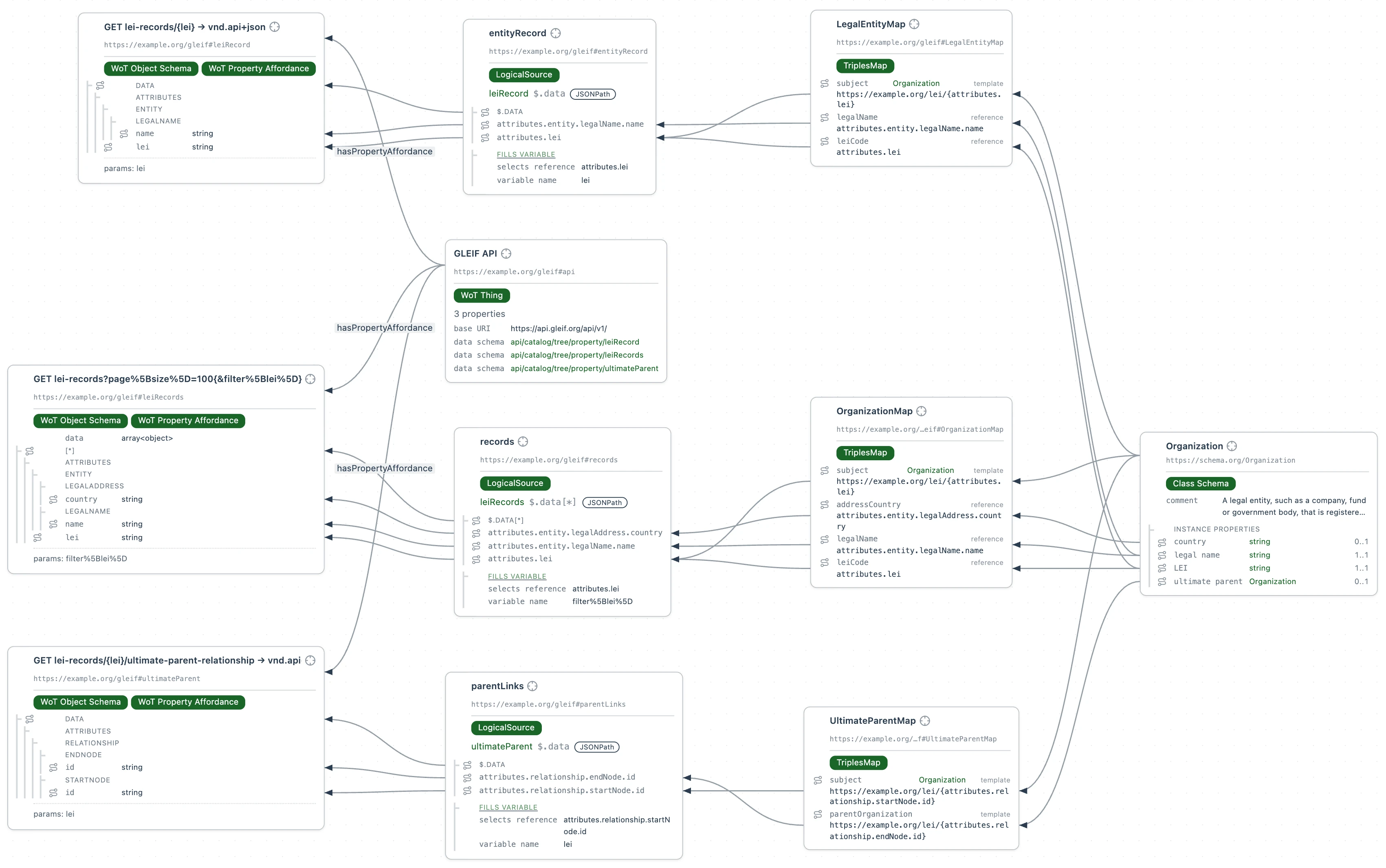
The organizations are addressed with the same template as each account's legalEntity in crm.ttl, https://example.org/lei/{…}, so an account and its legal entity at GLEIF meet on the LEI.
8. Join across sources
One query follows the LEI from a deal in Postgres to a parent company at GLEIF.
Select New file, then SPARQL Query. Name the file pipeline-by-parent.rq, paste this query into it and select Run:
PREFIX crm: <https://example.org/crm#>
PREFIX schema: <https://schema.org/>

SELECT ?parent (COUNT(?deal) AS ?deals) (SUM(?amount) AS ?pipeline) WHERE {
  # Each deal, with its stage, what it is worth and the account it is with.
  ?deal a crm:Deal ;
    crm:stage ?stage ;
    crm:amount ?amount ;
    crm:account ?account .
  # Only the deals still open.
  FILTER(?stage != "Closed Won")
  # The legal entity the account trades as, from the LEI in the CRM.
  ?account crm:legalEntity ?entity .
  # The company GLEIF records as that entity's ultimate parent, and its legal name.
  ?entity schema:parentOrganization ?parentEntity .
  ?parentEntity schema:legalName ?parent .
}
# One row for each parent company, the biggest pipeline first.
GROUP BY ?parent
ORDER BY DESC(?pipeline)
Hand Held Products, Vocollect, UOP and Elster Solutions are all Honeywell. GLEIF records no parent for Snap-on or Grainger, and Nordson has no LEI in the CRM, so their deals aren't under a parent.
Ask your agent to…
- Break the open pipeline under each ultimate parent down by account owner, and say which owner carries the most of it.
- List the parent companies with open deals closing before the end of 2026, with the pipeline under each.