Folio answers questions about your data in SPARQL, the query language for knowledge graphs. You ask in the terms of your domain model, such as taxi zones and their pickups, and Folio reads the data files your mapping names to answer. One query can read several data files at once.
These examples use the NYC Taxi & Limousine Commission's (TLC) public trip data, which you can set up in Query data files.
The domain model is one class, Zone, with four properties:
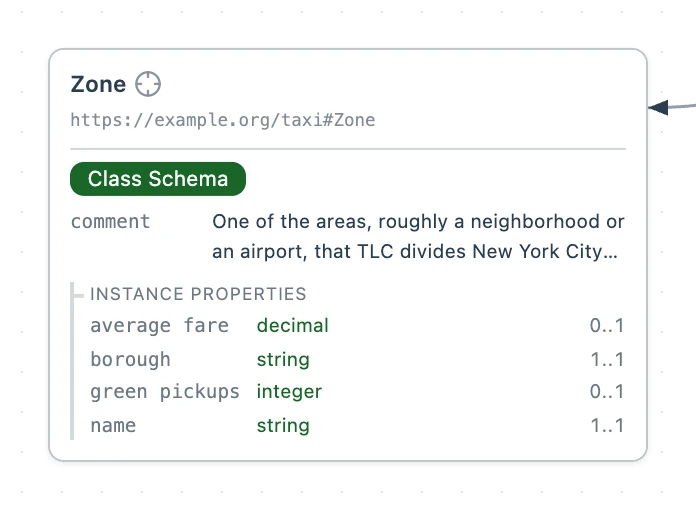
# A zone is one of the areas TLC divides New York City into.
taxi:Zone a svs:ClassSchema ;
  rdfs:label "Zone" ;
  rdfs:comment """One of the areas, roughly a neighborhood or an airport, that TLC
    divides New York City into and that trip records give instead of an address.""" ;
  sh:property [
    sh:path taxi:name ;
    sh:name "name" ;
    sh:description "The name TLC gives the zone, such as Astoria or JFK Airport." ;
    sh:datatype xsd:string ;
    sh:minCount 1 ;
    sh:maxCount 1
  ], [
    sh:path taxi:borough ;
    sh:name "borough" ;
    sh:description """Which of New York City's five boroughs the zone lies in, or EWR
      for Newark Airport.""" ;
    sh:datatype xsd:string ;
    sh:minCount 1 ;
    sh:maxCount 1
  ], [
    sh:path taxi:greenPickups ;
    sh:name "green pickups" ;
    sh:description "How many green taxi trips started in the zone in January 2024." ;
    sh:datatype xsd:integer ;
    sh:maxCount 1
  ], [
    sh:path taxi:averageFare ;
    sh:name "average fare" ;
    sh:description """The average amount a green taxi trip that started in the zone
      charged its riders in January 2024, in US dollars.""" ;
    sh:datatype xsd:decimal ;
    sh:maxCount 1
  ] .
1. List the zones
A query describes the answer it wants with triple patterns. A triple pattern is a statement with a variable in it, a name written with a ?: ?zone a taxi:Zone matches each thing that is a zone. PREFIX gives https://example.org/taxi#, the namespace the Zone class is declared in, the short name taxi:. The answer has one row for each way the patterns match, and one column for each variable after SELECT.
ORDER BY sorts the rows, and LIMIT keeps the first few. Each query's SQL tab asks roughly the same question in SQL, of the data files directly.
PREFIX taxi: <https://example.org/taxi#>

# Select two columns: the zone's name and its borough.
SELECT ?name ?borough WHERE {
  # For each thing that is a zone
  ?zone a taxi:Zone ;
    # Select its name as name and borough as borough
    taxi:name ?name ;
    taxi:borough ?borough .
}
# Sort by name, A to Z
ORDER BY ?name
# Keep the first ten
LIMIT 10
-- For illustration only: roughly the same query in SQL

SELECT "Zone" AS name, "Borough" AS borough
FROM 'taxi_zone_lookup.csv'
ORDER BY "Zone"
LIMIT 10;
2. Filter and sort
FILTER keeps only the rows that pass a test, and ORDER BY DESC sorts the rows largest first.
PREFIX taxi: <https://example.org/taxi#>

# Select two columns: the zone and its pickups.
SELECT ?zone ?pickups WHERE {
  # For each zone, select its green pickups as pickups
  ?zone taxi:greenPickups ?pickups .
  # Keep only the zones with more than 2000 pickups
  FILTER(?pickups > 2000)
}
# Sort by pickups, most first
ORDER BY DESC(?pickups)
-- For illustration only: roughly the same query in SQL

-- One row for each zone, with how many trips started in it
SELECT "PULocationID" AS zone, count(*) AS pickups
FROM 'green_tripdata_2024-01.parquet'
GROUP BY "PULocationID"
HAVING count(*) > 2000
ORDER BY pickups DESC;
74 for https://example.org/taxi/zone/74.3. Join two data files
A join matches two patterns on the same variable. In this query, ?zone takes its pickups from the Parquet file and its name from the CSV file. Both maps build a zone's address from its zone number, so the two patterns match the same zone.
This query and the ones in steps 4 and 5 read the whole Parquet file, so they run with Allow full fetch selected.
PREFIX taxi: <https://example.org/taxi#>

# Select two columns: the zone's name and its pickups.
SELECT ?name ?pickups WHERE {
  # For each zone, select its green pickups as pickups, from the Parquet file
  ?zone taxi:greenPickups ?pickups .
  # Select the same zone's name as name, from the CSV file
  ?zone taxi:name ?name .
  # Keep only the zones with more than 2000 pickups
  FILTER(?pickups > 2000)
}
# Sort by pickups, most first
ORDER BY DESC(?pickups)
-- For illustration only: roughly the same query in SQL

-- One row for each zone, with how many trips started in it
WITH pickups AS (
  SELECT "PULocationID" AS zone, count(*) AS pickups
  FROM 'green_tripdata_2024-01.parquet'
  GROUP BY "PULocationID"
)
SELECT z."Zone" AS name, p.pickups
FROM pickups AS p
-- Match each zone to its row in the CSV file, by its number
JOIN 'taxi_zone_lookup.csv' AS z ON z."LocationID" = p.zone
WHERE p.pickups > 2000
ORDER BY p.pickups DESC;
4. Keep the zones with no pickups
OPTIONAL keeps a row when its pattern matches nothing, and leaves its variable blank.
PREFIX taxi: <https://example.org/taxi#>

# Select two columns: the zone's name and its pickups, if any.
SELECT ?name ?pickups WHERE {
  # For each zone whose borough is Staten Island
  ?zone taxi:borough "Staten Island" ;
    # Select its name as name
    taxi:name ?name .
  # Select its green pickups as pickups, or leave pickups blank if it has none
  OPTIONAL { ?zone taxi:greenPickups ?pickups . }
}
# Sort by name, A to Z
ORDER BY ?name
# Keep the first ten
LIMIT 10
-- For illustration only: roughly the same query in SQL

-- One row for each zone, with how many trips started in it
WITH pickups AS (
  SELECT "PULocationID" AS zone, count(*) AS pickups
  FROM 'green_tripdata_2024-01.parquet'
  GROUP BY "PULocationID"
)
SELECT z."Zone" AS name, p.pickups
FROM 'taxi_zone_lookup.csv' AS z
-- Keep every zone, and leave pickups blank where it had none
LEFT JOIN pickups AS p ON p.zone = z."LocationID"
WHERE z."Borough" = 'Staten Island'
ORDER BY z."Zone"
LIMIT 10;
OPTIONAL, the query returns only the 4 zones with a pickup.5. Count and add up
GROUP BY puts the rows that share a value into one row. COUNT and SUM then count the rows in each group and add up a value across them.
PREFIX taxi: <https://example.org/taxi#>

# Select three columns: the borough, its zones with pickups, and its pickups in all.
SELECT ?borough (COUNT(?zone) AS ?zones) (SUM(?pickups) AS ?totalPickups) WHERE {
  # For each zone, select its borough as borough, from the CSV file
  ?zone taxi:borough ?borough ;
    # and its green pickups as pickups, from the Parquet file
    taxi:greenPickups ?pickups .
}
# Group the rows by borough: count the zones and add up the pickups in each
GROUP BY ?borough
# Sort by total pickups, most first
ORDER BY DESC(?totalPickups)
-- For illustration only: roughly the same query in SQL

-- One row for each zone, with how many trips started in it
WITH pickups AS (
  SELECT "PULocationID" AS zone, count(*) AS pickups
  FROM 'green_tripdata_2024-01.parquet'
  GROUP BY "PULocationID"
)
SELECT z."Borough" AS borough, count(*) AS zones, sum(p.pickups) AS "totalPickups"
FROM pickups AS p
JOIN 'taxi_zone_lookup.csv' AS z ON z."LocationID" = p.zone
-- One row for each borough: count its zones and add up their pickups
GROUP BY z."Borough"
ORDER BY "totalPickups" DESC;