Each profile Folio ships with, what it checks, and an example of a file under it. How profiles work covers how a file gets its profile.
Turtle examples on this page use these prefixes:
@prefix : <https://example.org/my-semantic-package/plants#> .
@prefix dct: <http://purl.org/dc/terms/> .
@prefix fleet: <https://example.org/my-semantic-package/fleet#> .
@prefix hctl: <https://www.w3.org/2019/wot/hypermedia#> .
@prefix map: <https://pkg.semvia.io/semvia/folio/mapping#> .
@prefix mcp: <https://pkg.semvia.io/semvia/mcp#> .
@prefix mdast: <https://pkg.semvia.io/semvia/folio/mdast#> .
@prefix prof: <http://www.w3.org/ns/dx/prof/> .
@prefix rdf: <http://www.w3.org/1999/02/22-rdf-syntax-ns#> .
@prefix rdfs: <http://www.w3.org/2000/01/rdf-schema#> .
@prefix rml: <http://w3id.org/rml/> .
@prefix role: <http://www.w3.org/ns/dx/prof/role/> .
@prefix sh: <http://www.w3.org/ns/shacl#> .
@prefix skos: <http://www.w3.org/2004/02/skos/core#> .
@prefix svds: <https://pkg.semvia.io/semvia/core/dataset#> .
@prefix svf: <https://pkg.semvia.io/semvia/rml/functions#> .
@prefix svgv: <https://pkg.semvia.io/semvia/core/graph#> .
@prefix svs: <https://pkg.semvia.io/semvia/core/meta-schema#> .
@prefix td: <https://www.w3.org/2019/wot/td#> .
@prefix xsd: <http://www.w3.org/2001/XMLSchema#> .
Class Schema
Checks svs:ClassSchema declarations, their fields, and the RDFS and OWL axioms between classes. It includes every check in RDF Schema. Classes lists each construct it reads.
<> dct:conformsTo <https://pkg.semvia.io/semvia/core/profiles/class-schema> .

:PowerPlant a svs:ClassSchema ;
  rdfs:label "Power plant"@en ;
  rdfs:comment "A facility that generates electricity for the grid."@en .
A field with no sh:name is flagged: This property has no Label, so forms name the field after its Path. Add a Label.
RDF Schema
Checks a plain RDFS vocabulary: classes, properties, and the domains, ranges and subclass links between them, with no SHACL.
<> dct:conformsTo <https://pkg.semvia.io/semvia/core/profiles/rdfs> .

:Substation a rdfs:Class ;
  rdfs:label "Substation"@en ;
  rdfs:comment "A site that switches and transforms power between lines."@en .

:connectsTo a rdf:Property ;
  rdfs:label "connects to"@en ;
  rdfs:comment "The substation a facility's transmission line runs to."@en ;
  rdfs:range :Substation .
rdfs:subClassOf "station" on Substation is flagged: On Substation, station for Extends must be a rdfs:Class.
SKOS Vocabulary
Checks a flat SKOS concept scheme: each concept needs one preferred label per language.
<> dct:conformsTo <https://pkg.semvia.io/semvia/folio/profiles/skos-vocabulary> .

:grid-regions a skos:ConceptScheme ;
  skos:prefLabel "Grid regions"@en .

:caiso a skos:Concept ;
  skos:prefLabel "CAISO"@en ;
  skos:definition "California Independent System Operator."@en ;
  skos:inScheme :grid-regions .
A concept with no skos:prefLabel is flagged: A concept needs a preferred label, the name every view shows for it. Give it at least one, and no more than one per language.
SKOS Taxonomy
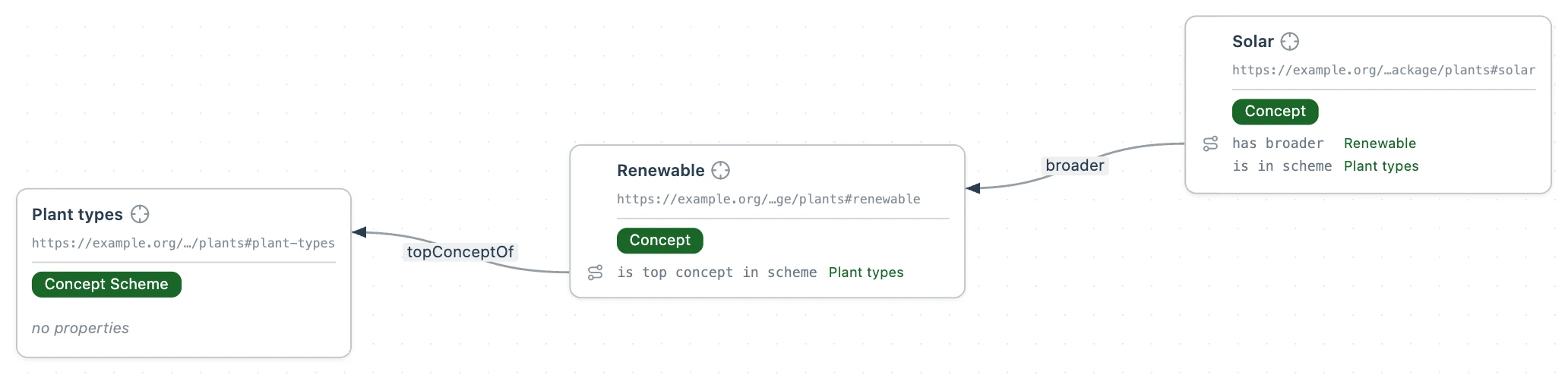
Checks a SKOS concept scheme whose concepts nest through skos:broader and skos:narrower, on top of every check in SKOS Vocabulary.
<> dct:conformsTo <https://pkg.semvia.io/semvia/folio/profiles/skos-taxonomy> .

:plant-types a skos:ConceptScheme ;
  skos:prefLabel "Plant types"@en .

:renewable a skos:Concept ;
  skos:prefLabel "Renewable"@en ;
  skos:topConceptOf :plant-types .

:solar a skos:Concept ;
  skos:prefLabel "Solar"@en ;
  skos:broader :renewable ;
  skos:inScheme :plant-types .
skos:broader "Renewable" is flagged: A broader value must be a concept. Point it at the parent concept rather than writing the parent's name as text.
Dataset and Package
Checks datasets, semantic packages, their members and their versions. A dataset file that claims its folder with svds:memberSpace has every file in the folder as a member, under the dataset-membership rule, and naming a second profile binds those members to it.
<> a svds:Dataset ;
  rdfs:label "Generation fleet"@en ;
  svds:memberSpace <./> ;
  dct:conformsTo <https://pkg.semvia.io/semvia/core/profiles/dataset-and-package>,
    <https://example.org/my-semantic-package/profile> .
svds:memberSpace "./", text rather than an address, is flagged: This dataset's Members is not an address, so no file joins the dataset through it. Write an address, e.g. ./ for this dataset's own folder.
Graph View
Checks svgv:GraphView declarations: each names a universe, the triples it draws from, and a view, how it lays them out. The built-in universes are svgv:workspaceUniverse, svgv:fileUniverse, svgv:datasetUniverse and svgv:semanticPackageUniverse. The built-in views are svgv:classHierarchyView, svgv:classesView, svgv:individualsView, svgv:wholeFileView and svgv:catalogView.
<> dct:conformsTo <https://pkg.semvia.io/semvia/core/profiles/graph-view> .

:fleet-classes a svgv:GraphView ;
  rdfs:label "Fleet classes"@en ;
  svgv:universeQuery svgv:workspaceUniverse ;
  svgv:viewQuery svgv:classHierarchyView .
A view with no svgv:universeQuery is flagged: Fleet classes must have at least 1 value for Universe.
MCP
Checks the tools, resources and prompts a file declares for Folio's MCP server.
<> dct:conformsTo <https://pkg.semvia.io/semvia/mcp/profiles/mcp> .

:plants-by-region a mcp:Resource, mcp:QueryResource ;
  mcp:name "plants-by-region" ;
  rdfs:comment "Every power plant with its grid region." ;
  mcp:sparql """
    PREFIX : <https://example.org/my-semantic-package/plants#>
    SELECT ?plant ?region WHERE { ?plant :gridRegion ?region }
  """ .
A resource with no rdfs:comment is flagged: plants-by-region must have at least 1 value for Description.
RML Mapping
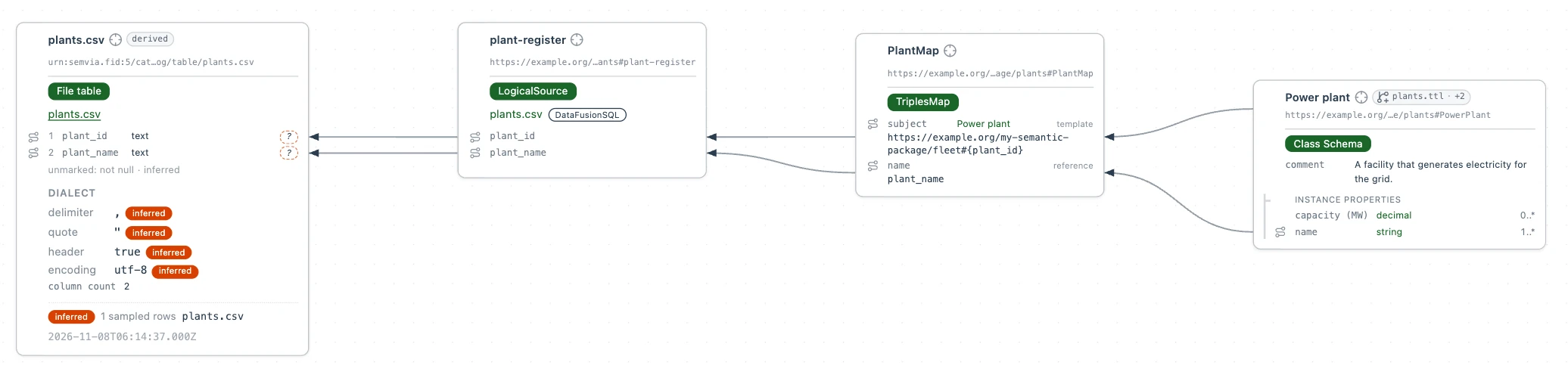
Checks RML triples maps and the logical sources they read. A map turns each row of a source into an entity. Name a second profile that declares the map's classes, so Folio knows them.
<> dct:conformsTo <https://pkg.semvia.io/semvia/rml/profiles/rml-mapping>,
    <https://example.org/my-semantic-package/profile> .

:plant-register a rml:LogicalSource ;
  rml:source [
    a rml:FilePath ;
    rml:path "plants.csv"
  ] ;
  rml:referenceFormulation svf:DataFusionSQL .

:PlantMap a rml:TriplesMap ;
  rml:logicalSource :plant-register ;
  rml:subjectMap [
    rml:template "https://example.org/my-semantic-package/fleet#{plant_id}" ;
    rml:class :PowerPlant
  ] ;
  rml:predicateObjectMap [
    rml:predicate :name ;
    rml:objectMap [ rml:reference "plant_name" ]
  ] .
With plants.csv at the workspace root:
plant_id,plant_name
dry-lake-solar,Dry Lake Solar
Folio adds fleet:dry-lake-solar, a PowerPlant named Dry Lake Solar, to the workspace graph. A map with no rml:logicalSource is flagged: PlantMap must have at least 1 value for Source.
Markdown Document
Reads a Markdown file as one document: the H1 titles it, and other headings stay plain text. A Markdown file whose mapping menu reads None (default) reads this profile.
# Desert Ridge Solar

A 240 MW photovoltaic plant in the CAISO balancing area, commissioned in June 2019.
Note
Reads a Markdown file under Note Map, picked in the mapping menu: every H2 to H6 heading becomes a section with an address of its own.
# Desert Ridge Solar

::mappedBy Note Map

## Outages

Inverter 4 offline from 2 to 9 March.
The Outages heading becomes the section #outages of the file's address.
Markdown Mapping
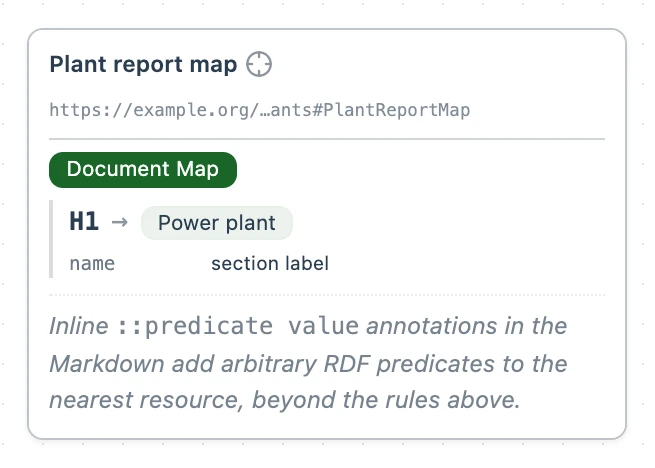
Checks document maps: the rules that turn Markdown headings and fields into entities. Each node rule names the kind of Markdown node it reads, the entity it writes, and where each field's value comes from.
<> dct:conformsTo <https://pkg.semvia.io/semvia/folio/profiles/markdown-mapping> .

:PlantReportMap a map:DocumentMap ;
  rdfs:label "Plant report map"@en ;
  map:nodeRule [
    a map:NodeRule ;
    map:nodeType mdast:Section ;
    map:depth 1 ;
    map:subjectType mdast:DocumentSelf ;
    map:outputType :PowerPlant ;
    map:propertyMapping [
      a map:PropertyMapping ;
      map:predicate :name ;
      map:fromField mdast:sectionLabel
    ]
  ] .
Each document map joins the mapping menu under its label, so Plant report map can be picked for any Markdown file. A node rule with no map:subjectType is flagged: this node must have at least 1 value for Becomes.
Web of Things
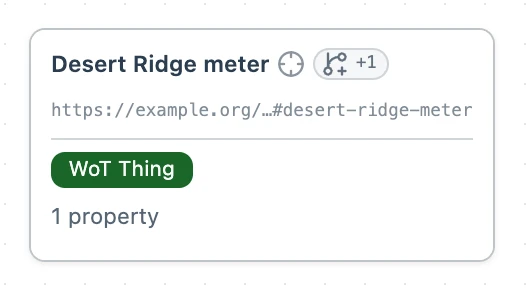
Checks a W3C Thing Description: a device's properties and the forms that say how to reach each one.
<> dct:conformsTo <https://pkg.semvia.io/semvia/core/profiles/web-of-things> .

fleet:desert-ridge-meter a td:Thing ;
  td:title "Desert Ridge meter" ;
  td:hasPropertyAffordance [
    a td:PropertyAffordance ;
    td:name "output" ;
    td:description "The meter's live output in megawatts." ;
    td:hasForm [ hctl:hasTarget <https://meters.example.org/desert-ridge/output> ]
  ] .
Semvia Authoring Profile
Checks a profile file: what it builds on, and the files it lists with their roles. A file listed for role:validation checks the entities of every file under the profile. A file listed for role:schema declares terms those files may use. The fleet's profile.ttl:
<> a prof:Profile ;
  dct:title "Fleet profile" ;
  dct:conformsTo <https://pkg.semvia.io/semvia/core/profiles/authoring-profile> ;
  prof:isProfileOf <https://pkg.semvia.io/semvia/core/profiles/class-schema> ;
  prof:hasResource [
    prof:hasRole role:schema, role:validation ;
    prof:hasArtifact <https://example.org/my-semantic-package/plants>
  ] .
A file's address in prof:hasArtifact is the workspace's base address followed by the file's path, without the extension. A resource with no prof:hasArtifact is flagged: must have at least 1 value for Artifact.