A connection defines where a source lives and how it signs in. It never holds the secret itself: workspace files are committed and shared, and Folio raises secret/committed on a password written into one. You bind each secret to a store on your machine, and Folio sends it only to the address the connection named when you bound it.
Before you start
You need a source in your workspace, such as one from Query a database, Query a JSON API or Query CSV, Parquet and Excel files. This guide continues the connection Query a database names in crm.ttl, a PostgreSQL database that needs a username and a password. The steps are the same for the other sources.
1. Say how the source signs in
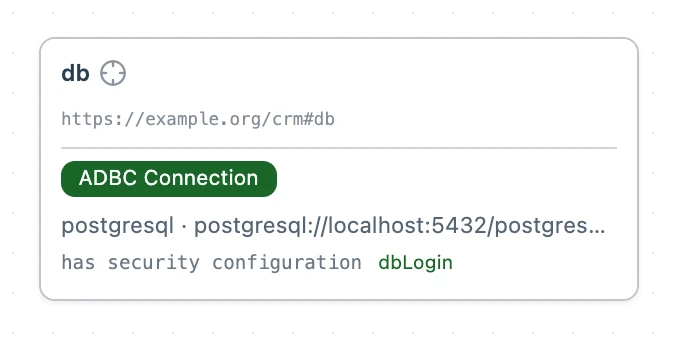
A connection points to the security scheme it signs in with through td:hasSecurityConfiguration, and a Postgres login is a Basic scheme. The first block of crm.ttl from Query a database already declares both, since crm:db points to crm:dbLogin, so the CRM database needs nothing added. For another source, add the same two parts: the td:hasSecurityConfiguration line on its connection and the scheme it points to.
@prefix dct:    <http://purl.org/dc/terms/> .
@prefix rml:    <http://w3id.org/rml/> .
@prefix td:     <https://www.w3.org/2019/wot/td#> .
@prefix wotsec: <https://www.w3.org/2019/wot/security#> .
@prefix svdb:   <https://pkg.semvia.io/semvia/rml/connection#> .
@prefix crm:    <https://example.org/crm#> .

# Folio checks this file as an RML mapping.
<> dct:conformsTo <https://pkg.semvia.io/semvia/rml/profiles/rml-mapping> .

# The CRM database. svdb:driver names the ADBC driver that reads it.
# svdb:endpoint is its address, written the way Postgres writes it.
# Put in your own server's address.
# Drop sslmode=disable unless the database is on your own machine.
crm:db a svdb:AdbcConnection ;
  svdb:driver "postgresql" ;
  svdb:endpoint "postgresql://localhost:5432/postgres?sslmode=disable" ;
  td:hasSecurityConfiguration crm:dbLogin .

# The database takes a username and a password. You bind them in Folio, never here.
crm:dbLogin a wotsec:BasicSecurityScheme ;
  wotsec:in "auto" .
Folio requires TLS and checks the server's certificate.
A Bind svwot:secretValue and a Bind svwot:username lens appear above crm:dbLogin, and Secrets lists both fields under Needs a credential. Until both are bound, crm:db and crm:dbLogin carry error marks that read "A secret-marked field has no bound credential". A query that needs the database stops with "nothing is bound for this credential field" until both are bound.
2. Pick a store
Select a Bind lens. A panel opens under it with a choice of where the secret lives:
| Store | What Folio keeps | Use it when |
|---|---|---|
| Keychain | The secret, in this machine's OS keychain | Your own machine. This is the default. |
| Memory | The secret, in the running engine only. It is gone when the engine restarts. | A shared or headless machine where nothing should be written to disk. |
| Env var | The variable's name. The value is read from the engine's environment each time. | CI, containers, or anywhere a secret manager already sets variables. |
| Provider → 1Password | A reference such as op://Shared/CRM DB/password. The 1Password CLI, from 1Password, supplies the value. | 1Password already holds it. |
| Provider → OAuth | The authorization the provider hands back after you sign in, in the keychain. Access tokens live in memory only. | The provider offers sign-in instead of a password. |
Choose a source, fill in the field and select Bind. A pasted secret is never shown again. To change it, bind the field again.
3. Test it
Open Secrets in the activity bar, select a field, then Test. Folio connects with the bound secrets and reports one verdict, such as Connection OK, Authentication failed or Host unreachable, without showing the secret or the server's reply.
Each secret is pinned to an address
When you bind a secret, Folio records the address it may be sent to:
- A database
- Its whole address, database name and TLS mode included, and the driver that reads it.
- A JSON API
- The origins of the forms in its Thing Description.
- CSV, Parquet or Excel files in a bucket
- The bucket, prefix and endpoint.
If an edit later moves the connection somewhere else, Folio stops sending the secret. To send it to the new address, open Secrets and confirm each field: select it, then Test. Test reports Destination not confirmed. Check the new address and select Confirm destination, or bind the field again.
What each source asks for
| Source | Scheme | Fields to bind |
|---|---|---|
Postgres (svdb:AdbcConnection) | wotsec:BasicSecurityScheme with wotsec:in "auto" | svwot:username, svwot:secretValue |
JSON API with a key (td:Thing) | wotsec:APIKeySecurityScheme with wotsec:in and wotsec:name, or wotsec:BearerSecurityScheme | svwot:secretValue |
JSON API with sign-in (td:Thing) | wotsec:OAuth2SecurityScheme | Bind with Provider → OAuth |
CSV, Parquet or Excel files in an Amazon S3 bucket (svdb:BlobConnection) | svdb:SigV4SecurityScheme | svwot:username (the access key ID), svwot:secretValue |
CSV, Parquet or Excel files in Azure Blob Storage (svdb:BlobConnection) | svdb:SharedKeySecurityScheme | svwot:secretValue |
On a JSON API's Thing, declare the scheme with td:definesSecurityScheme and apply it with td:hasSecurityConfiguration.
CSV, Parquet and Excel files in the workspace or at a public URL need no scheme.
Ask your agent to…
- Move the database connection in crm.ttl to db2.example.com, and tell me what I need to confirm in Folio.