A semantic package works exactly like other packages you might be familiar with in npm, pip or Cargo: a manifest (sem.json) describes the package, a collection of files, which is bundled up and published to a registry. After that any other workspace that has access to the registry can add it as a dependency and leverage its contents.
| Folio | Familiar as |
|---|---|
sem.json | package.json, pyproject.toml, Cargo.toml |
requires in sem.json | dependencies. Each entry names a minimum version, and Folio picks versions by minimal version selection, as Go does. |
sem.sum.json | Go's go.sum: the digest of each version the workspace resolved. Folio recomputes the versions from requires each time, so it isn't a lockfile. |
imports/ | node_modules, site-packages |
| Publish Package | npm publish, cargo publish, with your bucket as the registry |
| A published version | Immutable, as on npm, PyPI and crates.io |
What differs is what a package carries: a semantic package carries a piece of a graph. An installed package's graph loads into the workspace, so any operations on the workspace read it along with your own files. Open world and scope maps each level of a workspace to Cargo, Go, Maven and pnpm.
This quickstart uses the API of the Global Legal Entity Identifier Foundation (GLEIF), which publishes the Legal Entity Identifier (LEI), a code that identifies a company in financial transactions. This quickstart builds on the connection to that API from Query a JSON API and Query a database and adds a legal entity class and Internationalized Resource Identifiers (IRIs), the web addresses that identify each legal entity. It packages the result as semvia/gleif-api and publishes version 0.1.0 to a bucket. It then installs the 0.1.0 that Semvia published at pkg.semvia.io in a second workspace and asks it who ultimately owns a company.
Before you start
To publish, you need an S3-compatible bucket you can write to, such as Amazon S3 or Cloudflare R2, and an access key ID and secret access key for it. Installing needs neither: step 4 installs the version Semvia published.
1. Make the package
A workspace is a package once its sem.json names and versions it. Open Packages. It lists your workspace's package under Workspace packages. Select its row to open the package editor, and fill in these fields, which Folio writes into sem.json:
- Title
GLEIF API. The name shown in Packages.- Version
0.1.0. The version the next publish uploads.- Base IRI
https://pkg.semvia.io/semvia/gleif-api/, the base IRI Semvia published 0.1.0 under. Where the package's terms live and how other workspaces install it. A package of your own takes a base IRI under a domain you control, and the IRIs in its files follow it.- Owner
Semvia. Who publishes the package.- Description
Reads the GLEIF API live: legal entities by name or LEI, and the company that ultimately owns each.
All files are swept into the workspace by default. Open world and scope covers how a package, its datasets and its profiles relate.
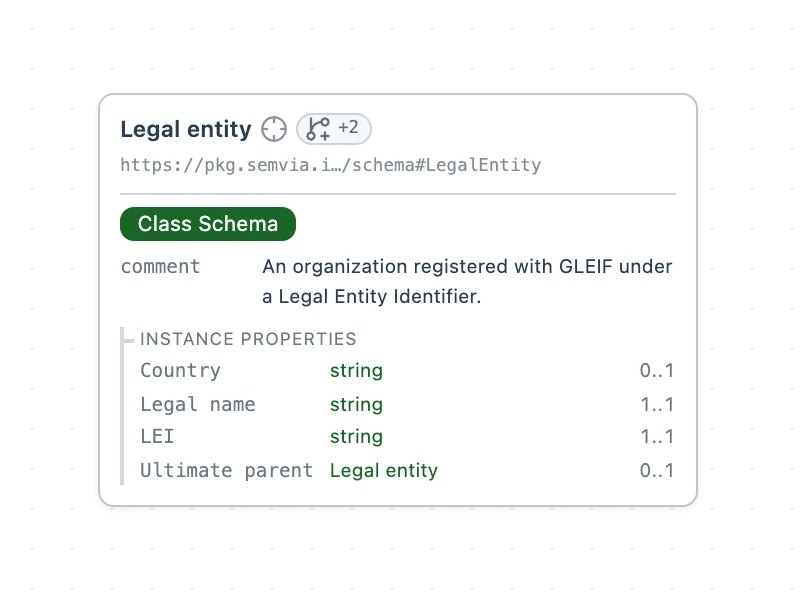
Select New file in the Explorer, pick Turtle, name the file schema.ttl, and paste this Turtle class schema into it. Its property constraints are written in the Shapes Constraint Language (SHACL), the standard for rules a graph must meet:
@prefix :       <https://pkg.semvia.io/semvia/gleif-api/schema#> .
@prefix dct:    <http://purl.org/dc/terms/> .
@prefix rdfs:   <http://www.w3.org/2000/01/rdf-schema#> .
@prefix schema: <https://schema.org/> .
@prefix sh:     <http://www.w3.org/ns/shacl#> .
@prefix svs:    <https://pkg.semvia.io/semvia/core/meta-schema#> .
@prefix xsd:    <http://www.w3.org/2001/XMLSchema#> .

<> dct:conformsTo <https://pkg.semvia.io/semvia/core/profiles/class-schema> .

# A legal entity: an organization GLEIF registers under a Legal Entity Identifier.
# Each has one LEI and one legal name, and may name the country of its legal
# address and the company that ultimately owns it.
:LegalEntity a svs:ClassSchema ;
  rdfs:label "Legal entity"@en ;
  rdfs:comment
    "An organization registered with GLEIF under a Legal Entity Identifier."@en ;
  sh:property [
    sh:path schema:leiCode ;
    sh:name "LEI"@en ;
    sh:datatype xsd:string ;
    sh:minCount 1 ;
    sh:maxCount 1 ;
    sh:description "The 20-character Legal Entity Identifier (ISO 17442)."@en
  ], [
    sh:path schema:legalName ;
    sh:name "Legal name"@en ;
    sh:datatype xsd:string ;
    sh:minCount 1 ;
    sh:maxCount 1 ;
    sh:description "The name the entity is registered under."@en
  ], [
    sh:path schema:addressCountry ;
    sh:name "Country"@en ;
    sh:datatype xsd:string ;
    sh:maxCount 1 ;
    sh:description "The ISO 3166-1 alpha-2 code of the legal address's country."@en
  ], [
    sh:path schema:parentOrganization ;
    sh:name "Ultimate parent"@en ;
    sh:class :LegalEntity ;
    sh:maxCount 1 ;
    sh:description
      "The highest-level entity that consolidates this one's accounts."@en
  ] .
Create api.ttl and paste in the connection. It holds a Thing Description, which documents the API's endpoints, and an RDF Mapping Language (RML) mapping, which turns each API response into entities. Query a JSON API covers both. Each legal entity's IRI is https://gleif.org/lei/ followed by its LEI, so an entity has the same IRI whichever endpoint returns it, and the ultimate-parent link joins the two records.
@prefix :           <https://pkg.semvia.io/semvia/gleif-api/api#> .
@prefix dct:        <http://purl.org/dc/terms/> .
@prefix gleif:      <https://pkg.semvia.io/semvia/gleif-api/schema#> .
@prefix hctl:       <https://www.w3.org/2019/wot/hypermedia#> .
@prefix htv:        <http://www.w3.org/2011/http#> .
@prefix jsonschema: <https://www.w3.org/2019/wot/json-schema#> .
@prefix rml:        <http://w3id.org/rml/> .
@prefix schema:     <https://schema.org/> .
@prefix svdb:       <https://pkg.semvia.io/semvia/rml/connection#> .
@prefix td:         <https://www.w3.org/2019/wot/td#> .

# Folio checks this file as a Web of Things description and as an RML mapping.
<> dct:conformsTo
    <https://pkg.semvia.io/semvia/core/profiles/web-of-things> ,
    <https://pkg.semvia.io/semvia/rml/profiles/rml-mapping> .

# The GLEIF API, and the three properties this package reads.
:api a td:Thing ;
  td:title "GLEIF API" ;
  td:baseURI "https://api.gleif.org/api/v1/" ;
  td:hasPropertyAffordance :leiRecords, :leiRecord, :ultimateParent .

# The LEI records, which GLEIF can filter by legal name: the request to send,
# and the fields of each record in the response that the mappings below read.
:leiRecords a td:PropertyAffordance, jsonschema:ObjectSchema ;
  td:name "leiRecords" ;
  td:hasUriTemplateSchema [
    a jsonschema:StringSchema ;
    td:name "filter%5Bentity.legalName%5D"
  ] ;
  td:hasForm [
    a hctl:Form ;
    hctl:hasTarget "lei-records?page%5Bsize%5D=100{&filter%5Bentity.legalName%5D}" ;
    htv:methodName "GET" ;
    hctl:forContentType "application/vnd.api+json"
  ] ;
  jsonschema:properties [
    a jsonschema:ArraySchema ;
    jsonschema:propertyName "data" ;
    td:description "The LEI records that match the request." ;
    jsonschema:items [
      a jsonschema:ObjectSchema ;
      jsonschema:properties [
        a jsonschema:ObjectSchema ;
        jsonschema:propertyName "attributes" ;
        td:description "What GLEIF registers for one LEI." ;
        jsonschema:properties [
          a jsonschema:StringSchema ;
          jsonschema:propertyName "lei" ;
          td:description "The 20-character Legal Entity Identifier (ISO 17442)."
        ], [
          a jsonschema:ObjectSchema ;
          jsonschema:propertyName "entity" ;
          td:description "The legal entity the LEI identifies." ;
          jsonschema:properties [
            a jsonschema:ObjectSchema ;
            jsonschema:propertyName "legalName" ;
            td:description "The registered legal name and its language." ;
            jsonschema:properties [
              a jsonschema:StringSchema ;
              jsonschema:propertyName "name" ;
              td:description "The name as recorded in the entity's registration."
            ]
          ], [
            a jsonschema:ObjectSchema ;
            jsonschema:propertyName "legalAddress" ;
            td:description "The address the entity registered in its jurisdiction." ;
            jsonschema:properties [
              a jsonschema:StringSchema ;
              jsonschema:propertyName "country" ;
              td:description "The ISO 3166-1 alpha-2 code of that address's country."
            ]
          ]
        ]
      ]
    ]
  ] .

# The record of the legal entity with a given LEI: the request to send, and
# the fields of the record in the response that the mapping below reads.
:leiRecord a td:PropertyAffordance, jsonschema:ObjectSchema ;
  td:name "leiRecord" ;
  td:hasUriTemplateSchema [
    a jsonschema:StringSchema ;
    td:name "lei"
  ] ;
  td:hasForm [
    a hctl:Form ;
    hctl:hasTarget "lei-records/{lei}" ;
    htv:methodName "GET" ;
    hctl:forContentType "application/vnd.api+json"
  ] ;
  jsonschema:properties [
    a jsonschema:ObjectSchema ;
    jsonschema:propertyName "data" ;
    td:description "The LEI record for the requested LEI." ;
    jsonschema:properties [
      a jsonschema:ObjectSchema ;
      jsonschema:propertyName "attributes" ;
      td:description "What GLEIF registers for the LEI." ;
      jsonschema:properties [
        a jsonschema:StringSchema ;
        jsonschema:propertyName "lei" ;
        td:description "The 20-character Legal Entity Identifier (ISO 17442)."
      ], [
        a jsonschema:ObjectSchema ;
        jsonschema:propertyName "entity" ;
        td:description "The legal entity the LEI identifies." ;
        jsonschema:properties [
          a jsonschema:ObjectSchema ;
          jsonschema:propertyName "legalName" ;
          td:description "The registered legal name and its language." ;
          jsonschema:properties [
            a jsonschema:StringSchema ;
            jsonschema:propertyName "name" ;
            td:description "The name as recorded in the entity's registration."
          ]
        ], [
          a jsonschema:ObjectSchema ;
          jsonschema:propertyName "legalAddress" ;
          td:description "The address the entity registered in its jurisdiction." ;
          jsonschema:properties [
            a jsonschema:StringSchema ;
            jsonschema:propertyName "country" ;
            td:description "The ISO 3166-1 alpha-2 code of that address's country."
          ]
        ]
      ]
    ]
  ] .

# The company that ultimately owns the legal entity with a given LEI: the
# request to send, and the two LEIs in the response that the mapping reads.
:ultimateParent a td:PropertyAffordance, jsonschema:ObjectSchema ;
  td:name "ultimateParent" ;
  td:hasUriTemplateSchema [
    a jsonschema:StringSchema ;
    td:name "lei"
  ] ;
  td:hasForm [
    a hctl:Form ;
    hctl:hasTarget "lei-records/{lei}/ultimate-parent-relationship" ;
    htv:methodName "GET" ;
    hctl:forContentType "application/vnd.api+json"
  ] ;
  jsonschema:properties [
    a jsonschema:ObjectSchema ;
    jsonschema:propertyName "data" ;
    td:description "The ultimate-parent relationship recorded for the LEI." ;
    jsonschema:properties [
      a jsonschema:ObjectSchema ;
      jsonschema:propertyName "attributes" ;
      td:description "What GLEIF records about the relationship." ;
      jsonschema:properties [
        a jsonschema:ObjectSchema ;
        jsonschema:propertyName "relationship" ;
        td:description "The child entity and the parent that consolidates it." ;
        jsonschema:properties [
          a jsonschema:ObjectSchema ;
          jsonschema:propertyName "startNode" ;
          td:description "The child entity, whose LEI was requested." ;
          jsonschema:properties [
            a jsonschema:StringSchema ;
            jsonschema:propertyName "id" ;
            td:description "The child entity's LEI."
          ]
        ], [
          a jsonschema:ObjectSchema ;
          jsonschema:propertyName "endNode" ;
          td:description "The ultimate parent." ;
          jsonschema:properties [
            a jsonschema:StringSchema ;
            jsonschema:propertyName "id" ;
            td:description "The ultimate parent's LEI."
          ]
        ]
      ]
    ]
  ] .

# Each record GLEIF returns for a legal name. A query that names a legal
# name asks GLEIF for that one only.
:recordsByName a rml:LogicalSource ;
  rml:source :leiRecords ;
  rml:referenceFormulation rml:JSONPath ;
  rml:iterator "$.data[*]" ;
  svdb:fillsVariable [
    a svdb:VariableFill ;
    svdb:variableName "filter%5Bentity.legalName%5D" ;
    svdb:selectsReference "attributes.entity.legalName.name"
  ] .

# The record GLEIF holds for one LEI.
:recordByLei a rml:LogicalSource ;
  rml:source :leiRecord ;
  rml:referenceFormulation rml:JSONPath ;
  rml:iterator "$.data" ;
  svdb:fillsVariable [
    a svdb:VariableFill ;
    svdb:variableName "lei" ;
    svdb:selectsReference "attributes.lei"
  ] .

# The ultimate-parent relationship GLEIF records for one LEI.
:parentLink a rml:LogicalSource ;
  rml:source :ultimateParent ;
  rml:referenceFormulation rml:JSONPath ;
  rml:iterator "$.data" ;
  svdb:fillsVariable [
    a svdb:VariableFill ;
    svdb:variableName "lei" ;
    svdb:selectsReference "attributes.relationship.startNode.id"
  ] .

# Turns each record found by legal name into a legal entity.
:ByNameMap a rml:TriplesMap ;
  rml:logicalSource :recordsByName ;
  rml:subjectMap [
    rml:template "https://gleif.org/lei/{attributes.lei}" ;
    rml:class gleif:LegalEntity
  ] ;
  rml:predicateObjectMap [
    rml:predicate schema:leiCode ;
    rml:objectMap [ rml:reference "attributes.lei" ]
  ], [
    rml:predicate schema:legalName ;
    rml:objectMap [ rml:reference "attributes.entity.legalName.name" ]
  ], [
    rml:predicate schema:addressCountry ;
    rml:objectMap [ rml:reference "attributes.entity.legalAddress.country" ]
  ] .

# Turns the record for one LEI into a legal entity.
:ByLeiMap a rml:TriplesMap ;
  rml:logicalSource :recordByLei ;
  rml:subjectMap [
    rml:template "https://gleif.org/lei/{attributes.lei}" ;
    rml:class gleif:LegalEntity
  ] ;
  rml:predicateObjectMap [
    rml:predicate schema:leiCode ;
    rml:objectMap [ rml:reference "attributes.lei" ]
  ], [
    rml:predicate schema:legalName ;
    rml:objectMap [ rml:reference "attributes.entity.legalName.name" ]
  ], [
    rml:predicate schema:addressCountry ;
    rml:objectMap [ rml:reference "attributes.entity.legalAddress.country" ]
  ] .

# Links each legal entity to the company that ultimately owns it.
:UltimateParentMap a rml:TriplesMap ;
  rml:logicalSource :parentLink ;
  rml:subjectMap [
    rml:template "https://gleif.org/lei/{attributes.relationship.startNode.id}" ;
    rml:class gleif:LegalEntity
  ] ;
  rml:predicateObjectMap [
    rml:predicate schema:parentOrganization ;
    rml:objectMap [
      rml:template "https://gleif.org/lei/{attributes.relationship.endNode.id}"
    ]
  ] .
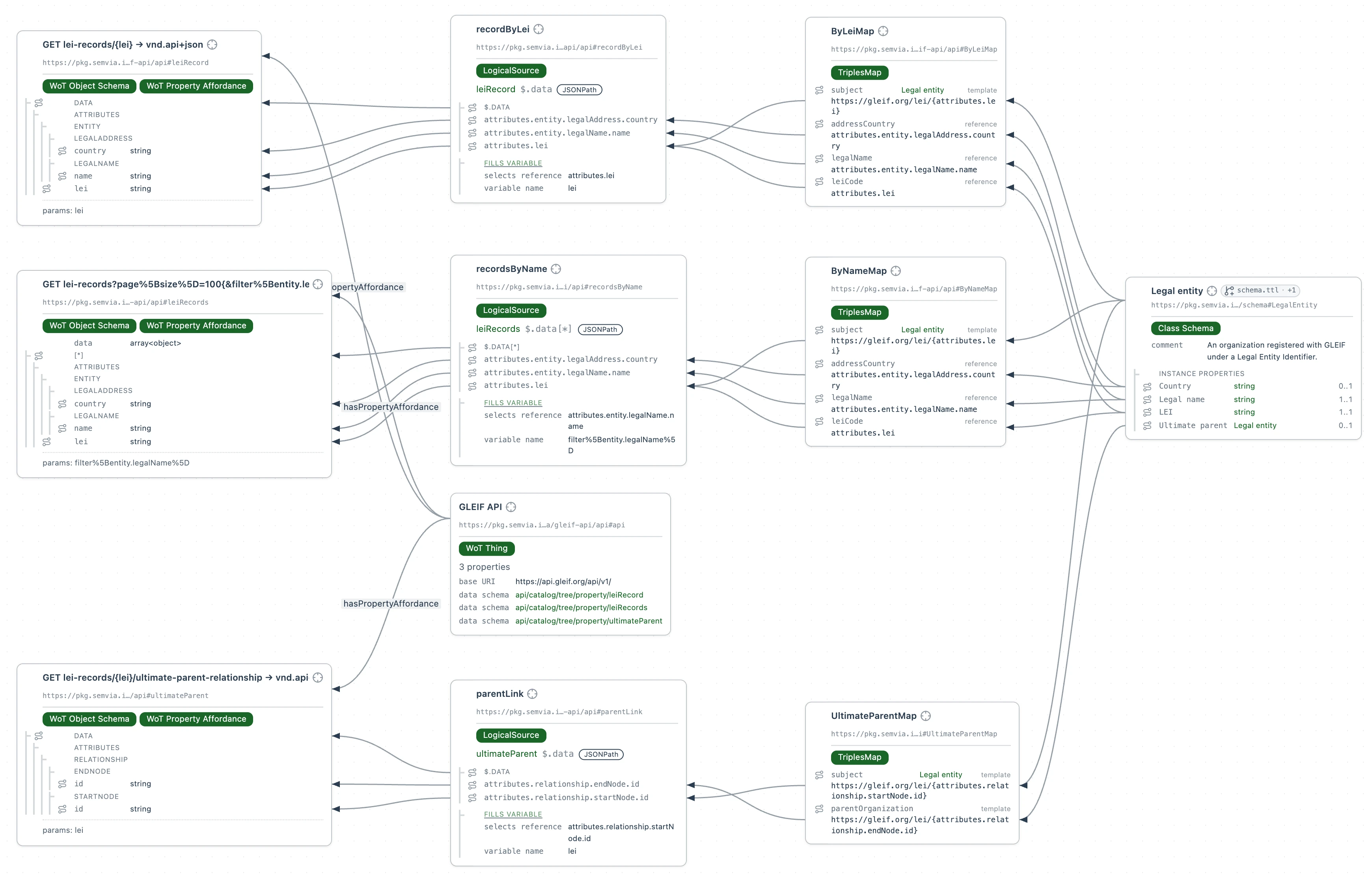
Each file names its profile with dct:conformsTo, and Problems lists nothing.
2. Build the package
In Packages, select Build Package on the GLEIF API row. Folio builds the package into built/ and shows "Built GLEIF API."
3. Publish version 0.1.0
Publishing uploads an archive of the package to your bucket, so first tell Folio where the bucket is. In the package editor, under Publish destination, select Set up destination, then S3-compatible bucket, and fill in your bucket:
- Bucket
- The bucket's name, such as
acme-packages. - Region
- The bucket's region, such as
eu-west-1. Cloudflare R2 takesauto. - Endpoint
- Your provider's S3 endpoint, such as
https://your-account-id.r2.cloudflarestorage.comfor Cloudflare R2. Leave it empty for Amazon S3. - Key prefix
- Where in the bucket the package's versions go, such as
semvia/gleif-api/.
Uploads to shows the key each version goes to. Select Save, and Folio writes the destination into sem.json as publishTo.
The card now asks for the bucket's access key, which your provider issues for the bucket as an access key ID and a secret access key. Select Bind access key… and bind the secret access key, in any store Add credentials describes. Select Bind access key… again and bind the access key ID. Select Test connection, and the card shows Connection OK.
In Packages, select Publish Package on the GLEIF API row. The Publish package dialog rehearses the build, then shows the package's base IRI, name and version, Never published for a first version, the Destination, and Will publish: the archive, 0.1.0.sem.tgz, and each file in it. Select Dry run to rehearse the publish without uploading.
Select Publish 0.1.0, and Folio uploads the archive to the key Uploads to showed. The dialog then shows Published gleif-api 0.1.0., the archive's digest, the address it was uploaded to, and the IRI it resolves as. A published version is never replaced: to publish a change, raise Version in the package editor and publish again.
Git repository is the other destination. It publishes a version as a tag in a git checkout of the workspace, and the checkout needs at least one commit; you push the tag with your own git.
4. Install the package
Now install the package the way any other workspace would. This step uses the 0.1.0 that Semvia published, so it works without a bucket of your own.
In a new workspace, open Packages and select Add Dependency. In the Add dependency dialog, paste this into Install a package:
https://pkg.semvia.io/semvia/gleif-api/@0.1.0
Select Install package. Folio downloads the archive, adds the package to requires in sem.json, records its digest in sem.sum.json, and unpacks it under imports/. Open world and scope covers what installing a package does and doesn't put in scope.
Select New file, pick SPARQL Query, name the file ultimate-parent.rq, and paste in this query, written in SPARQL, the standard query language for graphs. Select Run.
PREFIX schema: <https://schema.org/>

SELECT ?parent WHERE {
  # The company GLEIF records as Hand Held Products' ultimate parent
  <https://gleif.org/lei/549300XSSOVXUBYXG862> schema:parentOrganization ?entity .
  # and the legal name that company is registered under.
  ?entity schema:legalName ?parent .
}
The installed mapping asks GLEIF for Hand Held Products' ultimate-parent relationship, then for the parent's record.