A profile names the vocabularies a file may use and the rules Folio checks it against. You pick the profiles; Folio checks your files against them. Each section below covers one part of how that works, and Built-in profiles lists the profiles Folio ships with.
What a profile is
A profile works the way imports do in code: a file may use the terms its profiles make available. The Class Schema profile below is an example. A file under it may use terms from vocabularies such as RDF Schema, SHACL and XML Schema's datatypes. The profile's meta-schema adds Semvia's terms for describing a class, such as svs:ClassSchema. Folio checks the file against the rules of the meta-schema and the RDF Schema profile. For example, the meta-schema asks every property for a name and a description.
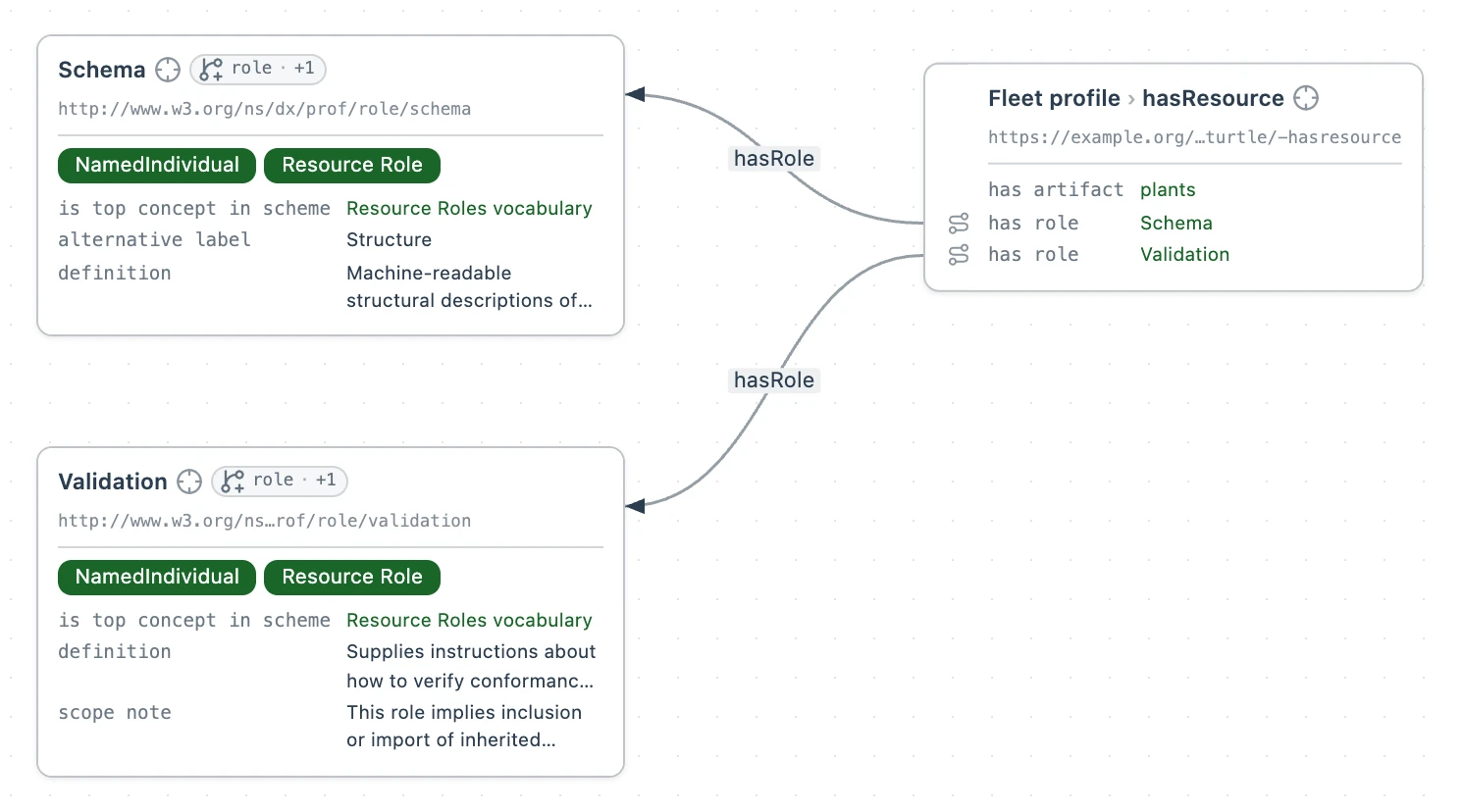
In Folio, a profile is represented using PROF. An artifact is a file the profile lists, such as a vocabulary or a set of rules written as SHACL shapes. A prof:Profile lists its artifacts with prof:hasResource, each with one or more roles. A file under the profile may use every term in the artifacts listed for role:vocabulary, and is checked against the shapes in the artifacts listed for role:validation. Both come from the profile's own artifacts and those of every profile it names with prof:isProfileOf.
# Class Schema, one of Folio's profiles, shown with two of its artifacts.
# A profile of RDF Schema, so RDF Schema's terms and shapes apply to its files too.
<https://pkg.semvia.io/semvia/core/profiles/class-schema> a prof:Profile ;
  dct:title "Class Schema"@en ;
  prof:isProfileOf <https://pkg.semvia.io/semvia/core/profiles/rdfs> ;
  prof:hasResource [
    prof:hasRole role:schema, role:validation ;
    prof:hasArtifact <https://pkg.semvia.io/semvia/core/meta-schema>
  ], [
    prof:hasRole role:vocabulary ;
    prof:hasArtifact <http://www.w3.org/2001/XMLSchema#>
  ] .
role:vocabulary makes an artifact's terms usable in the file, and role:validation checks the file against the artifact's shapes. Folio reads role:schema, which Class Schema lists for its meta-schema and Fleet profile below lists for plants.ttl, as role:vocabulary.
Every dataset is a profile too. A dataset with no prof:hasResource offers everything it declares, in its descriptor and its member files, for both vocabulary and validation; a prof:hasResource on the dataset replaces that default.
Where a file gets its profile
A file is always checked against the datasets that hold it: the nearest dataset whose space claims it, or, for a file no dataset claims, the workspace's root package, which its root sem.json describes. Open world and scope explains why. On top of that dataset scope, a file reads its profiles from the nearest of three places. The nearest place that names a profile binds the file, and the farther ones add nothing to it.
- The file. A
<> dct:conformsToline in the file itself, with<>, the file, as its subject. - The dataset. A
dct:conformsToon the dataset that holds the file. A dataset claims its files withsvds:memberSpace, often<./>, the folder it is declared in. Under the dataset-membership rule, a file belongs to the nearest dataset that claims it and reads that dataset's profile. - The workspace. The
"conformsTo"key in the rootsem.json, set in the Default profiles field of the package editor in Packages.
plant-types/index.ttl claims the plant-types folder:
@prefix dct: <http://purl.org/dc/terms/> .
@prefix svds: <https://pkg.semvia.io/semvia/core/dataset#> .

# The plant-types folder: every file in it writes a SKOS taxonomy.
<> a svds:Dataset ;
  dct:title "Plant type taxonomy"@en ;
  svds:memberSpace <./> ;
  dct:conformsTo <https://pkg.semvia.io/semvia/folio/profiles/skos-taxonomy> .
A file in the same folder with no dct:conformsTo line of its own reads SKOS Taxonomy.
No profile
A Turtle file that none of the three places binds is checked against the datasets that hold it and nothing else: a term none of them declares draws a warning, and only their shapes check the file. Its Profile button reads the title of the dataset that holds it, which for a file no dataset claims is the root package's title. unbound.ttl is one, at the root of a workspace titled plants-profiles whose root package also holds plants.ttl:
@prefix plants: <https://example.org/my-semantic-package/plants#> .
@prefix rdfs: <http://www.w3.org/2000/01/rdf-schema#> .
@prefix : <https://example.org/my-semantic-package/fleet#> .

# Copper Flats Solar, in a file that names no profile.
:copper-flats rdfs:label "Copper Flats Solar"@en ;
  plants:capacityMW 180.0 .
The Profile menu
The Profile menu at the top right of an open Turtle file is a checklist: the workspace's own profiles and datasets, then Folio's, then any the file names that the workspace does not have. Ticking a profile adds it to the file's <> dct:conformsTo line, and unticking it takes it off. The menu binds the open file alone and never changes the workspace default.
The menu's button reads the file's binding:
- Class Schema
- The file names one profile itself. Two read as Class Schema, Graph View.
- SKOS Taxonomy · inherited
- The file names none, and reads its profile from the dataset that holds it. The menu ticks only the profiles a file names itself, so no profile is ticked.
- Note · default
- The file reads the workspace default.
- plants-profiles
- Nothing binds the file, so the button reads the title of the dataset that holds it, here the root package, and the file is checked against that dataset alone.
plant-types/plant-types.ttl names no profile, so it reads SKOS Taxonomy from plant-types/index.ttl:
@prefix : <https://example.org/my-semantic-package/plants#> .
@prefix skos: <http://www.w3.org/2004/02/skos/core#> .

# The kinds of plant in the fleet, as a SKOS concept scheme.
:plant-types a skos:ConceptScheme ;
  skos:prefLabel "Plant types"@en .
More than one profile
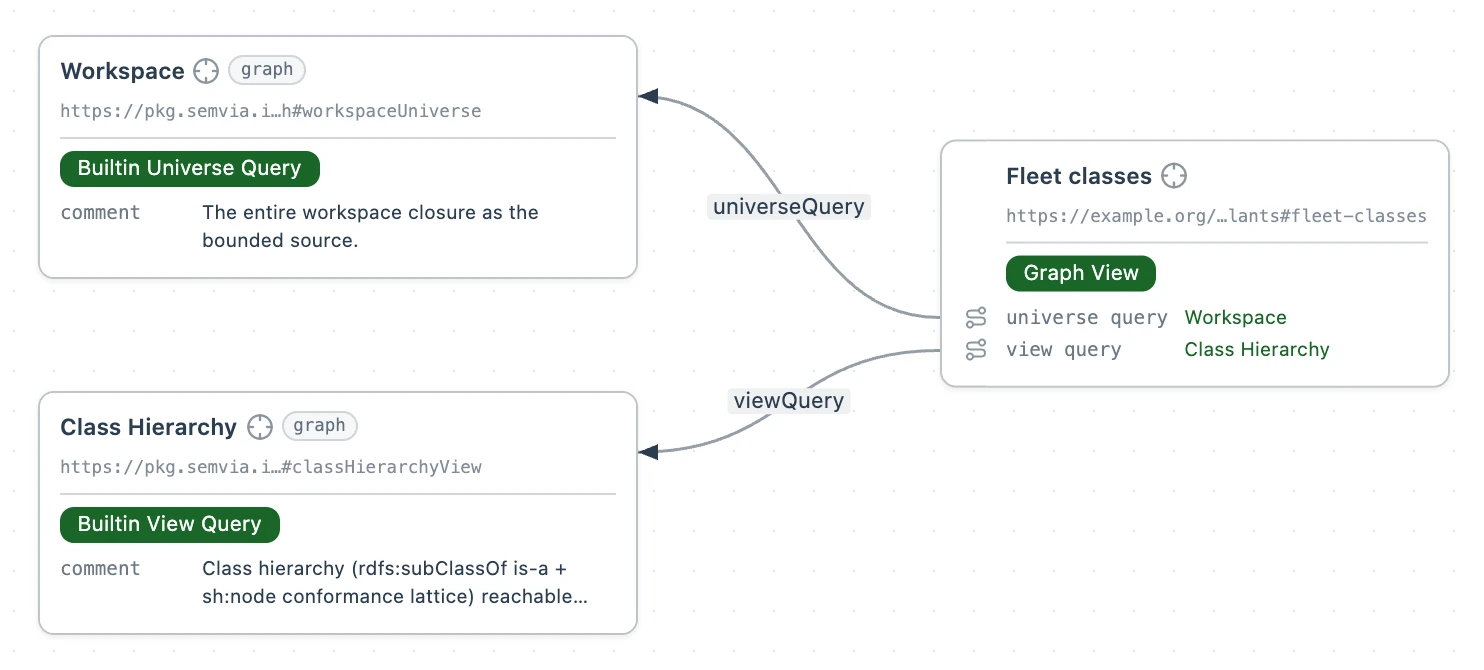
A file that names two profiles in one place gets both: it may use the terms of both, is checked against the shapes of both, and is offered the classes of both when it creates a resource. fleet-views.ttl names Class Schema and Graph View, and uses Graph View's terms.
@prefix : <https://example.org/my-semantic-package/plants#> .
@prefix dct: <http://purl.org/dc/terms/> .
@prefix rdfs: <http://www.w3.org/2000/01/rdf-schema#> .
@prefix svgv: <https://pkg.semvia.io/semvia/core/graph#> .

<> dct:conformsTo <https://pkg.semvia.io/semvia/core/profiles/class-schema>,
    <https://pkg.semvia.io/semvia/core/profiles/graph-view> .

# A graph view that draws the fleet's classes as a hierarchy.
:fleet-classes a svgv:GraphView ;
  rdfs:label "Fleet classes"@en ;
  svgv:universeQuery svgv:workspaceUniverse ;
  svgv:viewQuery svgv:classHierarchyView .
What a profile checks
A profile checks a file for two kinds of problem.
- Undeclared terms
- Each term the file uses must be declared by the datasets that hold it or by an artifact of one of its profiles. That covers every kind of term: classes, properties, datatypes, and individuals under a namespace a loaded dataset owns. An undeclared term is marked on its line in the editor, and its tooltip reads, for a property, "Nothing in this document's datasets or profiles declares the property" with the term's IRI.
- Shapes
- The file must meet the SHACL shapes in its profiles'
role:validationartifacts. Each result is listed in Problems and marked on its line.
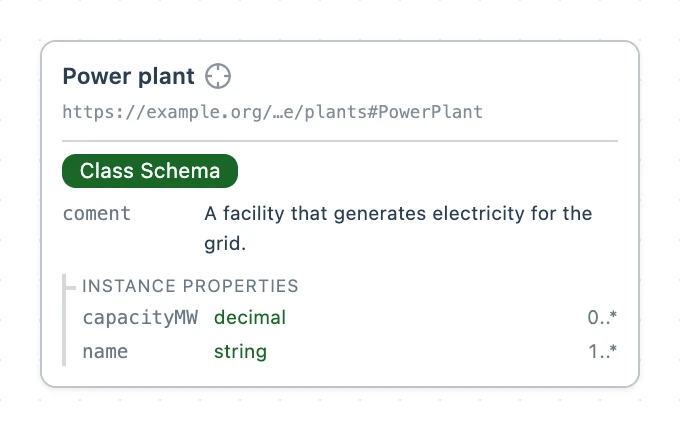
plants.ttl has one of each: rdfs:coment is a misspelling nothing in its scope declares, and the capacity property has no sh:name, which Class Schema's shapes ask for.
@prefix : <https://example.org/my-semantic-package/plants#> .
@prefix dct: <http://purl.org/dc/terms/> .
@prefix rdfs: <http://www.w3.org/2000/01/rdf-schema#> .
@prefix sh: <http://www.w3.org/ns/shacl#> .
@prefix svs: <https://pkg.semvia.io/semvia/core/meta-schema#> .
@prefix xsd: <http://www.w3.org/2001/XMLSchema#> .

# Folio checks this file against the Class Schema profile.
<> dct:conformsTo <https://pkg.semvia.io/semvia/core/profiles/class-schema> .

# A PowerPlant is a facility that generates electricity for the grid.
# Every plant has a name; its capacity is optional.
:PowerPlant a svs:ClassSchema ;
  rdfs:label "Power plant"@en ;
  rdfs:coment "A facility that generates electricity for the grid."@en ;
  sh:property [
    sh:path :name ;
    sh:name "name"@en ;
    sh:description "The plant's registered name."@en ;
    sh:datatype xsd:string ;
    sh:minCount 1
  ], [
    sh:path :capacityMW ;
    sh:description "Nameplate capacity in megawatts."@en ;
    sh:datatype xsd:decimal
  ] .
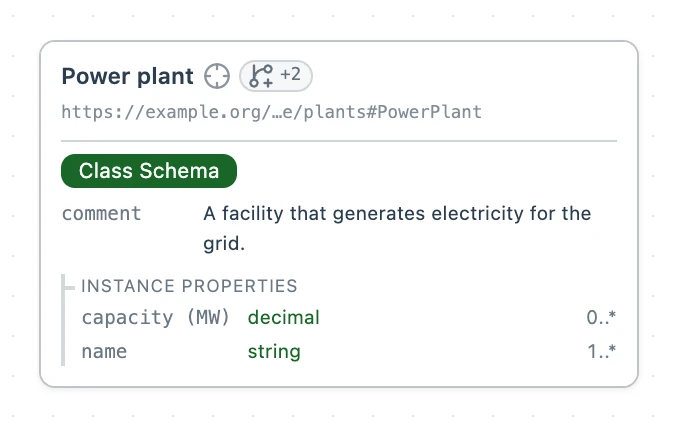
Spelling rdfs:comment and adding sh:name "capacity (MW)"@en ; under the capacity property's sh:path clears both, and Problems lists nothing.
Markdown files
A Markdown file reads its profile from its map, picked in the mapping menu at the top right of the Markdown editor, which writes a ::mappedBy line into the file. Left at None (default), it reads Markdown Document. Note Map reads Note, as Desert Ridge Solar.md does.
# Desert Ridge Solar

::mappedBy Note Map

## Outages

Inverter 4 offline from 2 to 9 March.
Your own profile
A profile you write is a Turtle file anywhere in the workspace, typed prof:Profile and bound to the Semvia Authoring Profile. It joins the Profile menu under its dct:title.
profile.ttl is a profile built on Class Schema that adds the fleet's classes. Its artifact is plants.ttl, with both fixes from the section above:
@prefix : <https://example.org/my-semantic-package/plants#> .
@prefix dct: <http://purl.org/dc/terms/> .
@prefix rdfs: <http://www.w3.org/2000/01/rdf-schema#> .
@prefix sh: <http://www.w3.org/ns/shacl#> .
@prefix svs: <https://pkg.semvia.io/semvia/core/meta-schema#> .
@prefix xsd: <http://www.w3.org/2001/XMLSchema#> .

# Folio checks this file against the Class Schema profile.
<> dct:conformsTo <https://pkg.semvia.io/semvia/core/profiles/class-schema> .

# A PowerPlant is a facility that generates electricity for the grid.
# Every plant has a name; its capacity is optional.
:PowerPlant a svs:ClassSchema ;
  rdfs:label "Power plant"@en ;
  rdfs:comment "A facility that generates electricity for the grid."@en ;
  sh:property [
    sh:path :name ;
    sh:name "name"@en ;
    sh:description "The plant's registered name."@en ;
    sh:datatype xsd:string ;
    sh:minCount 1
  ], [
    sh:path :capacityMW ;
    sh:name "capacity (MW)"@en ;
    sh:description "Nameplate capacity in megawatts."@en ;
    sh:datatype xsd:decimal
  ] .
@prefix dct: <http://purl.org/dc/terms/> .
@prefix prof: <http://www.w3.org/ns/dx/prof/> .
@prefix role: <http://www.w3.org/ns/dx/prof/role/> .

# The Fleet profile: Class Schema, plus the classes plants.ttl declares,
# so a file bound to it is checked against the plants domain model.
<> a prof:Profile ;
  dct:title "Fleet profile" ;
  dct:conformsTo <https://pkg.semvia.io/semvia/core/profiles/authoring-profile> ;
  prof:isProfileOf <https://pkg.semvia.io/semvia/core/profiles/class-schema> ;
  prof:hasResource [
    prof:hasRole role:schema, role:validation ;
    prof:hasArtifact <https://example.org/my-semantic-package/plants>
  ] .
A file that names Fleet profile is checked against the shapes in plants.ttl. A file at the workspace root is checked against them already, because the root package holds plants.ttl. The plant file below sits in a sites folder that a dataset of its own claims, so only the binding brings the shapes in. sites/index.ttl claims the folder and conforms only to Dataset and Package, the profile that checks dataset files:
@prefix dct: <http://purl.org/dc/terms/> .
@prefix svds: <https://pkg.semvia.io/semvia/core/dataset#> .

<> dct:conformsTo <https://pkg.semvia.io/semvia/core/profiles/dataset-and-package> .

# The plant sites: every file in the sites folder.
<> a svds:Dataset ;
  dct:title "Plant sites"@en ;
  svds:memberSpace <./> .
sites/desert-ridge.ttl names Fleet profile and states no name:
@prefix plants: <https://example.org/my-semantic-package/plants#> .
@prefix dct: <http://purl.org/dc/terms/> .
@prefix : <https://example.org/my-semantic-package/fleet#> .

<> dct:conformsTo <https://example.org/my-semantic-package/profile> .

# Desert Ridge, a power plant of 240 megawatts, with no name yet.
:desert-ridge a plants:PowerPlant ;
  plants:capacityMW 240.0 .