Folio maps JSON web APIs to your domain model and reads them at query time. You describe an API as a W3C Thing Description, and a mapping picks the fields of each response out with JSONPath. To read only what a query needs, Folio fills the API's query and path parameters from the query's filters, sends one request per key when the query joins the API to another source, follows offset, page-number, cursor and next-link pagination, and reuses responses as the API's cache headers allow. Nothing is copied.
This quickstart uses the API of GLEIF, the Global Legal Entity Identifier Foundation, which publishes the Legal Entity Identifier (LEI), a code that identifies a company in financial transactions. The API needs no account. Federation intro covers why your domain model stays in your workspace while the data stays in the source.
1. Describe the API
Folio uses Thing Descriptions to document systems and the endpoints they expose. Folio relies on the description to know where to send a request and what comes back. In Folio, select New file in the Explorer, then Turtle. Name the file gleif.ttl and paste this into it:
@prefix dct:        <http://purl.org/dc/terms/> .
@prefix rdfs:       <http://www.w3.org/2000/01/rdf-schema#> .
@prefix sh:         <http://www.w3.org/ns/shacl#> .
@prefix xsd:        <http://www.w3.org/2001/XMLSchema#> .
@prefix td:         <https://www.w3.org/2019/wot/td#> .
@prefix hctl:       <https://www.w3.org/2019/wot/hypermedia#> .
@prefix htv:        <http://www.w3.org/2011/http#> .
@prefix jsonschema: <https://www.w3.org/2019/wot/json-schema#> .
@prefix rml:        <http://w3id.org/rml/> .
@prefix svdb:       <https://pkg.semvia.io/semvia/rml/connection#> .
@prefix svs:        <https://pkg.semvia.io/semvia/core/meta-schema#> .
@prefix schema:     <https://schema.org/> .
@prefix gleif:      <https://example.org/gleif#> .

# Folio checks this file as a Web of Things description, a class schema and an
# RML mapping.
<> dct:conformsTo
    <https://pkg.semvia.io/semvia/core/profiles/web-of-things> ,
    <https://pkg.semvia.io/semvia/core/profiles/class-schema> ,
    <https://pkg.semvia.io/semvia/rml/profiles/rml-mapping> .

# The GLEIF API, and the one property it offers here.
gleif:api a td:Thing ;
  td:title "GLEIF API" ;
  td:baseURI "https://api.gleif.org/api/v1/" ;
  td:hasPropertyAffordance gleif:leiRecords .

# The LEI records, which GLEIF can filter by LEI: the request to send,
# and the fields of each record in the response that the map below reads.
gleif:leiRecords a td:PropertyAffordance, jsonschema:ObjectSchema ;
  td:name "leiRecords" ;
  td:hasUriTemplateSchema [
    a jsonschema:StringSchema ;
    td:name "filter%5Blei%5D"
  ] ;
  td:hasForm [
    a hctl:Form ;
    hctl:hasTarget "lei-records?page%5Bsize%5D=100{&filter%5Blei%5D}" ;
    htv:methodName "GET" ;
    hctl:forContentType "application/vnd.api+json"
  ] ;
  jsonschema:properties [
    a jsonschema:ArraySchema ;
    jsonschema:propertyName "data" ;
    td:description "The LEI records that match the request." ;
    jsonschema:items [
      a jsonschema:ObjectSchema ;
      jsonschema:properties [
        a jsonschema:ObjectSchema ;
        jsonschema:propertyName "attributes" ;
        td:description "What GLEIF registers for one LEI." ;
        jsonschema:properties [
          a jsonschema:StringSchema ;
          jsonschema:propertyName "lei" ;
          td:description "The 20-character Legal Entity Identifier (ISO 17442)."
        ], [
          a jsonschema:ObjectSchema ;
          jsonschema:propertyName "entity" ;
          td:description "The legal entity the LEI identifies." ;
          jsonschema:properties [
            a jsonschema:ObjectSchema ;
            jsonschema:propertyName "legalName" ;
            td:description "The registered legal name and its language." ;
            jsonschema:properties [
              a jsonschema:StringSchema ;
              jsonschema:propertyName "name" ;
              td:description "The name as recorded in the entity's registration."
            ]
          ], [
            a jsonschema:ObjectSchema ;
            jsonschema:propertyName "legalAddress" ;
            td:description "The address the entity registered in its jurisdiction." ;
            jsonschema:properties [
              a jsonschema:StringSchema ;
              jsonschema:propertyName "country" ;
              td:description "The ISO 3166-1 alpha-2 code of that address's country."
            ]
          ]
        ]
      ]
    ]
  ] .

# Each record in the response. A query that names an LEI asks GLEIF for that
# record only.
gleif:records a rml:LogicalSource ;
  rml:source gleif:leiRecords ;
  rml:referenceFormulation rml:JSONPath ;
  rml:iterator "$.data[*]" ;
  svdb:fillsVariable [
    a svdb:VariableFill ;
    svdb:variableName "filter%5Blei%5D" ;
    svdb:selectsReference "attributes.lei"
  ] .

# Turns each record into an organization entity.
gleif:OrganizationMap a rml:TriplesMap ;
  rml:logicalSource gleif:records ;
  rml:subjectMap [
    rml:template "https://example.org/lei/{attributes.lei}" ;
    rml:class schema:Organization
  ] ;
  rml:predicateObjectMap [
    rml:predicate schema:leiCode ;
    rml:objectMap [ rml:reference "attributes.lei" ]
  ], [
    rml:predicate schema:legalName ;
    rml:objectMap [ rml:reference "attributes.entity.legalName.name" ]
  ], [
    rml:predicate schema:addressCountry ;
    rml:objectMap [ rml:reference "attributes.entity.legalAddress.country" ]
  ] .

# An organization is a legal entity, such as a company or a fund, that GLEIF
# registers under a Legal Entity Identifier.
schema:Organization a svs:ClassSchema ;
  rdfs:label "Organization" ;
  rdfs:comment """A legal entity, such as a company, fund or government body, that
    is registered under a Legal Entity Identifier.""" ;
  sh:property [
    sh:path schema:leiCode ;
    sh:name "LEI" ;
    sh:description """The 20-character Legal Entity Identifier (ISO 17442) that
      identifies the organization in financial transactions.""" ;
    sh:datatype xsd:string ;
    sh:minCount 1 ;
    sh:maxCount 1
  ], [
    sh:path schema:legalName ;
    sh:name "legal name" ;
    sh:description """The name the organization is registered under in its
      jurisdiction.""" ;
    sh:datatype xsd:string ;
    sh:minCount 1 ;
    sh:maxCount 1
  ], [
    sh:path schema:addressCountry ;
    sh:name "country" ;
    sh:description """The ISO 3166-1 alpha-2 code of the country of the organization's
      legal address.""" ;
    sh:datatype xsd:string ;
    sh:maxCount 1
  ] .
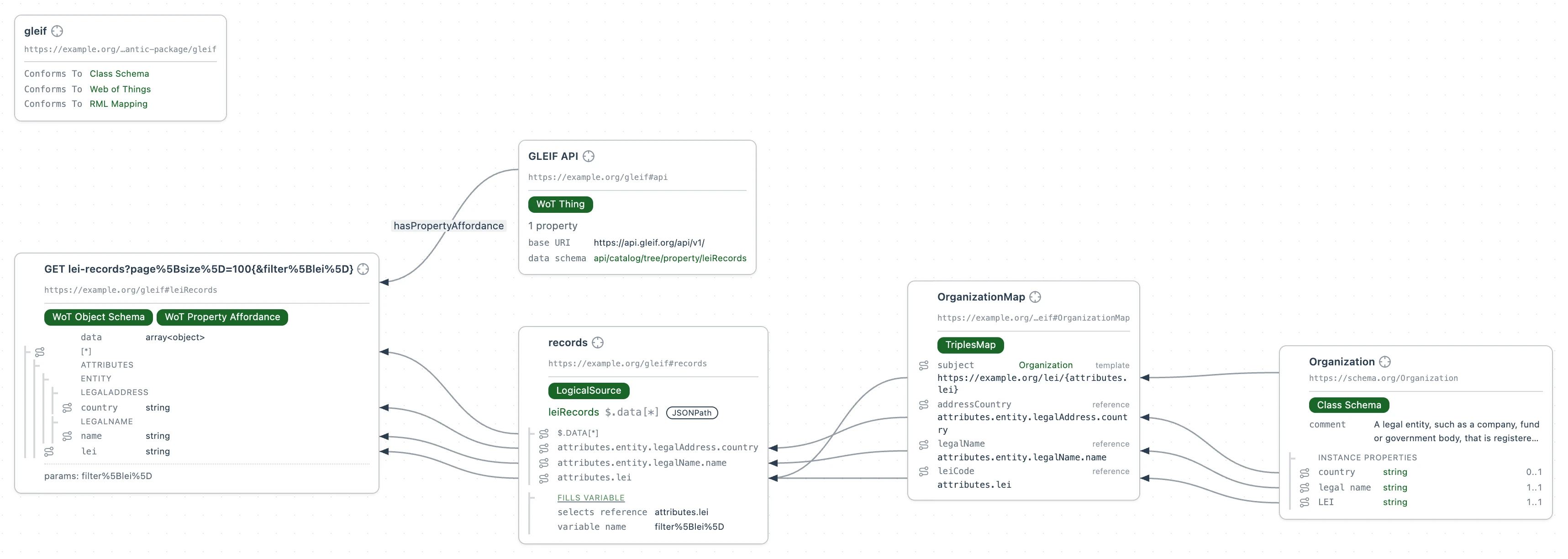
2. Ask a question
Query the API through the mapping, to see its response as entities in the graph. This query looks up the legal name behind one Legal Entity Identifier.
Select New file, then SPARQL Query. Name the file lei.rq, paste this query into it and select Run:
PREFIX schema: <https://schema.org/>

SELECT ?lei ?name WHERE {
  # Each organization's LEI and the legal name it is registered under.
  ?org a schema:Organization ;
    schema:leiCode ?lei ;
    schema:legalName ?name .
  # Only the organization with this LEI.
  FILTER(?lei = "UGKYQUOFW6QSIS3P4P93")
}
Folio sends the LEI to GLEIF as a filter, so GLEIF returns that one record.
If an API takes a key, bind it as Add credentials shows.
Each database, API or spreadsheet you add maps onto the same domain model, so one query can span them.
Next: Add credentials Call an API that needs a key or a sign-in, without writing the key into a file.